
Claude Opus 4.6 for Developers: Agent Teams, 1M Context, and What Actually Matters
Source: Dev.to
TL;DR – What’s New
| Feature | What It Does | Why You Care |
|---|---|---|
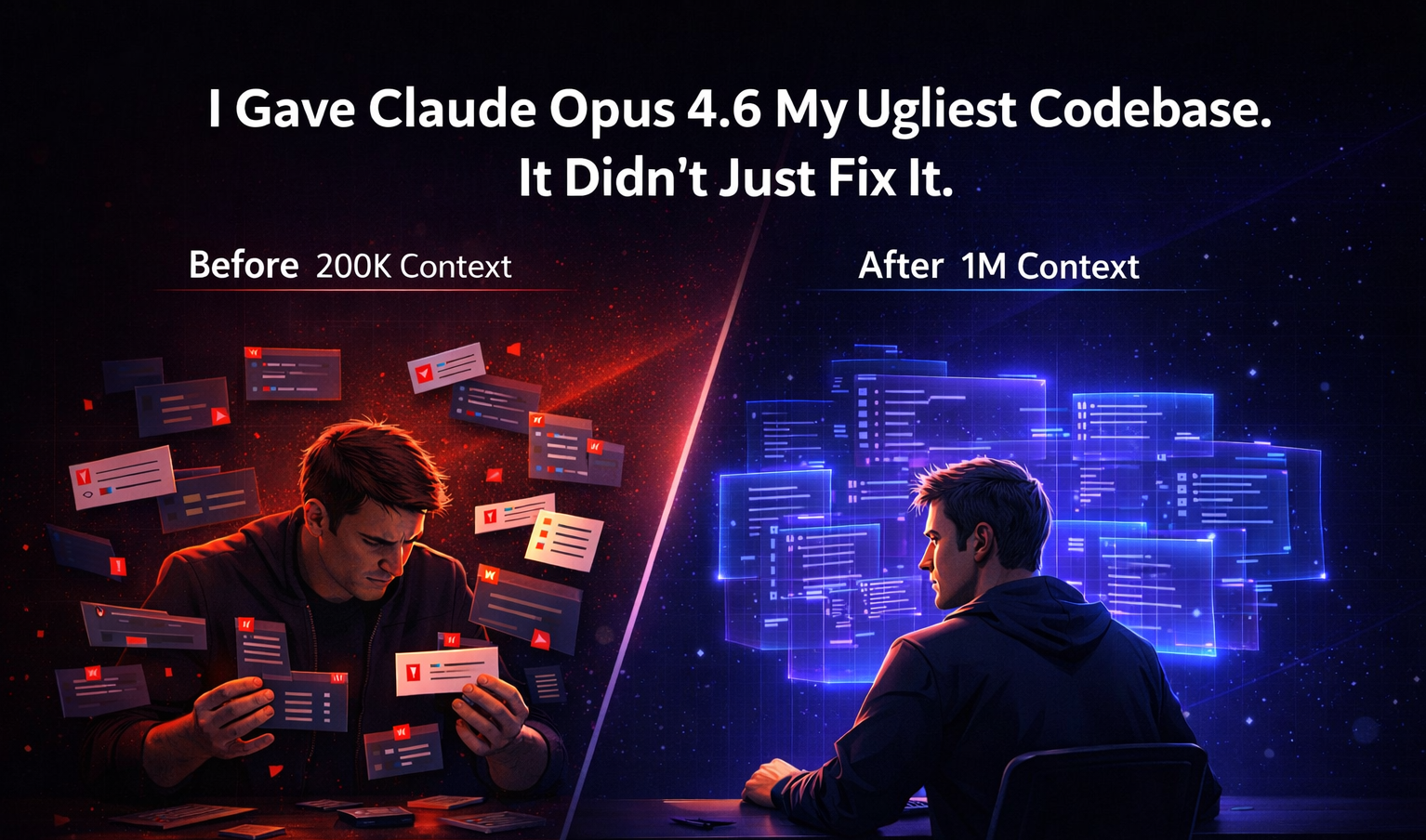
| 1 M token context | Process ~30 K lines of code in one shot | Full code‑base understanding, not just snippets |
| Agent teams | Multiple Claude instances work in parallel | Code review in ~90 s instead of ~30 min |
| Adaptive thinking | 4 effort levels (low → max) | Pay less for simple tasks, go deep when needed |
| Context compaction | Auto‑summarises old context | Long‑running sessions without context rot |
| 128 K output tokens | 4× more output | Complete implementations, not truncated fragments |
1. Agent Teams (Research Preview)
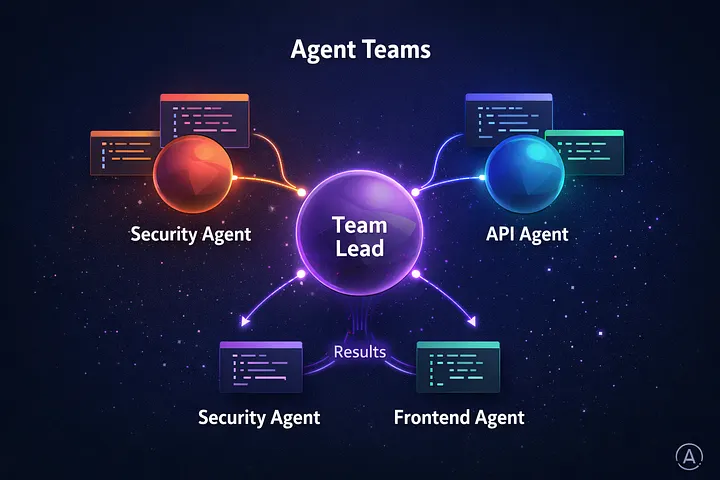
Why it matters – This is the headline feature for Claude Code users.
| Before | After |
|---|---|
| One agent, sequential processing (e.g., review a PR file‑by‑file) | Describe a team structure; Claude spawns multiple agents that work independently and coordinate |
How to enable
Via settings.json
{
  "experimental": {
    "agentTeams": true
  }
}
Or via environment variable
export CLAUDE_CODE_EXPERIMENTAL_AGENT_TEAMS=trueBest use cases
- Code review across layers – security agent + API agent + frontend agent
- Debugging competing hypotheses – each agent tests a different theory in parallel
- New features spanning multiple services – each agent owns its domain
- Large‑scale refactoring – divide‑and‑conquer across modules
How it actually works
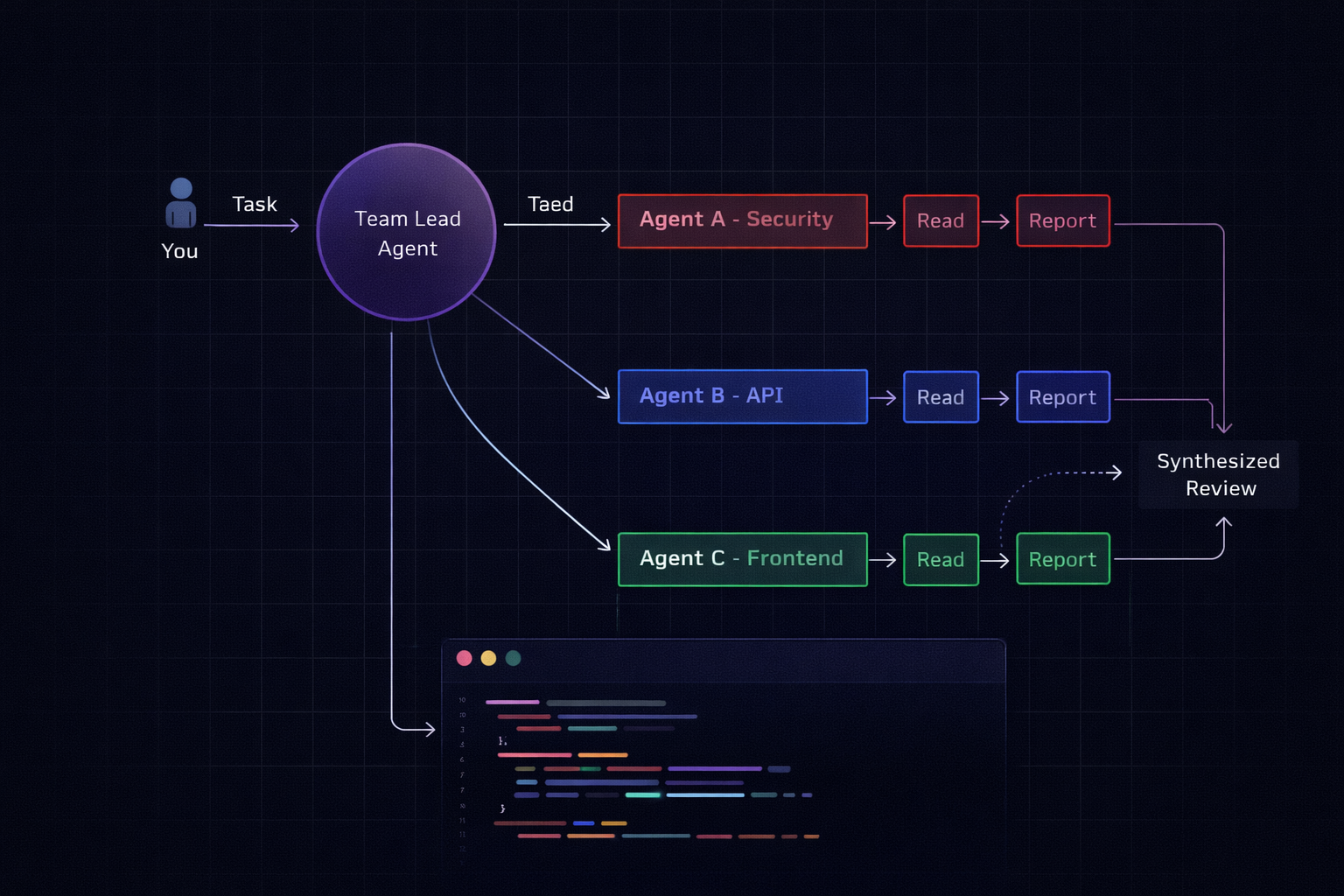
- One session acts as team lead.
- The lead breaks the task into subtasks and spawns teammate sessions (each with its own context window).
- Teammates work independently and communicate results back to the lead.
- The lead synthesises the findings.
You can jump into any sub‑agent with Shift+↑/↓ or via tmux.
Pro tip: Agent teams shine on read‑heavy tasks. For write‑heavy tasks where agents might conflict on the same files, a single‑agent approach is still more reliable.
2. The 1 M‑Token Context Window That Actually Works
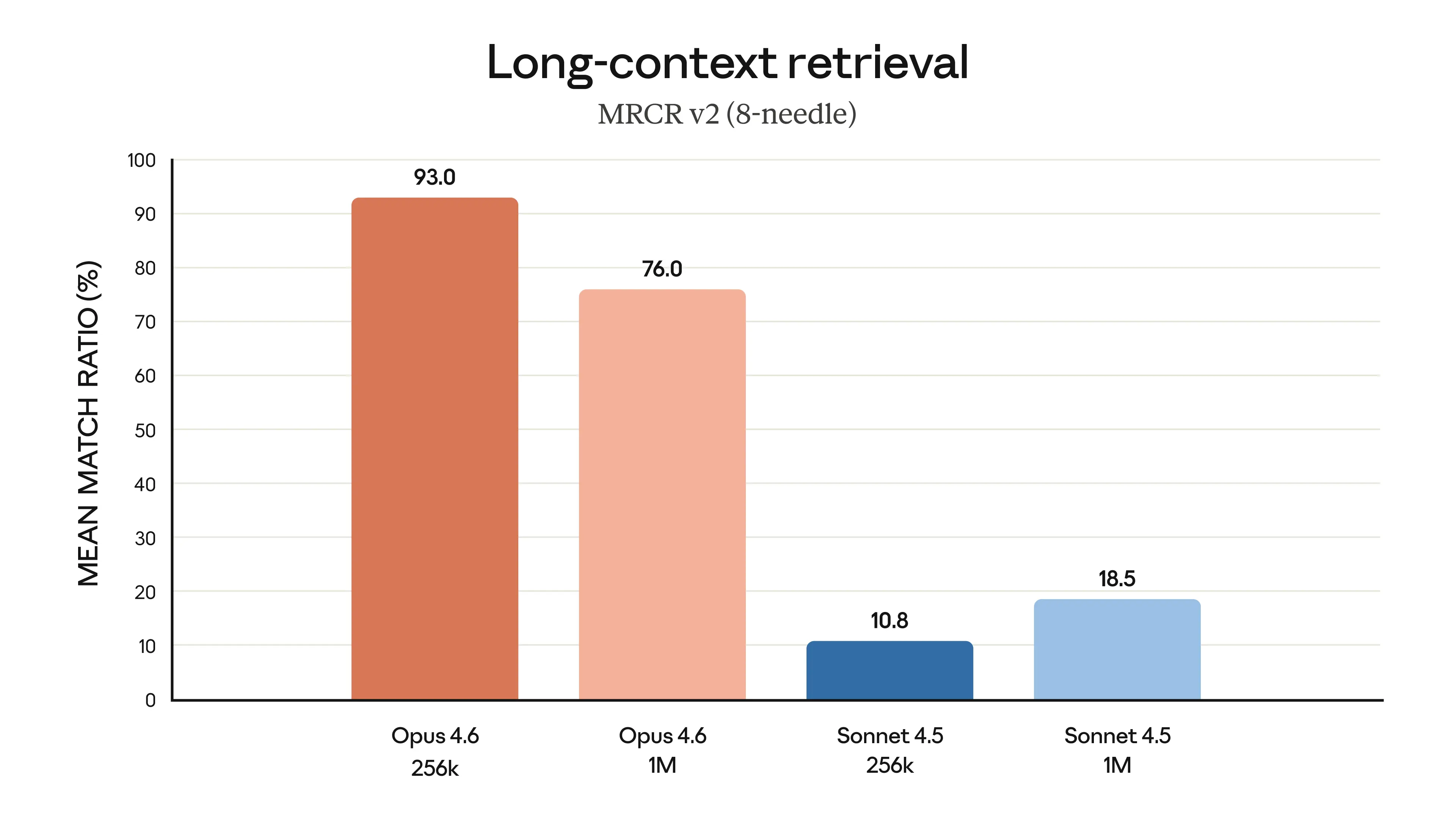
Other models have had large context windows before. The difference here is retrieval quality.
Anthropic’s MRCR v2 benchmark (measures a model’s ability to find and reason about specific information buried in massive context) shows:
Opus 4.6 : 76.0% ████████████████████████████████████████
Sonnet 4.5: 18.5% ███
This isn’t just “more tokens.” It’s the difference between a model that remembers what’s in its context and one that forgets.
How this changes your daily workflow
| Task | Before (≈200 K tokens) | After (≈1 M tokens) |
|---|---|---|
| Bug tracing | Feed files one‑by‑one, re‑explain architecture | “Trace the bug from queue to API” – sees everything |
| Code review | Summarise the PR yourself | Feed the entire diff + surrounding code |
| New feature | Describe your codebase in the prompt | Let the model read the whole codebase directly |
| Refactoring | Lose context after ~15 files | All 47 files live in one session |
Practical example
# Load your entire service into Claude Code
cat src/**/*.ts | wc -l
# → 28 000 lines – comfortably fits in a 1 M‑token window

# Ask Claude to trace a bug across the full codebase
> "The /api/tasks endpoint sometimes returns stale data.
>  Trace the data flow from the queue processor through
>  the cache layer to the API response handler."
Pricing note: Standard pricing ($5 / $25 per million input/output tokens) applies up to 200 K tokens. Beyond that, premium pricing kicks in at $10 / $37.50. For most dev workflows you’ll stay under 200 K.
3. Adaptive Thinking & Effort Levels
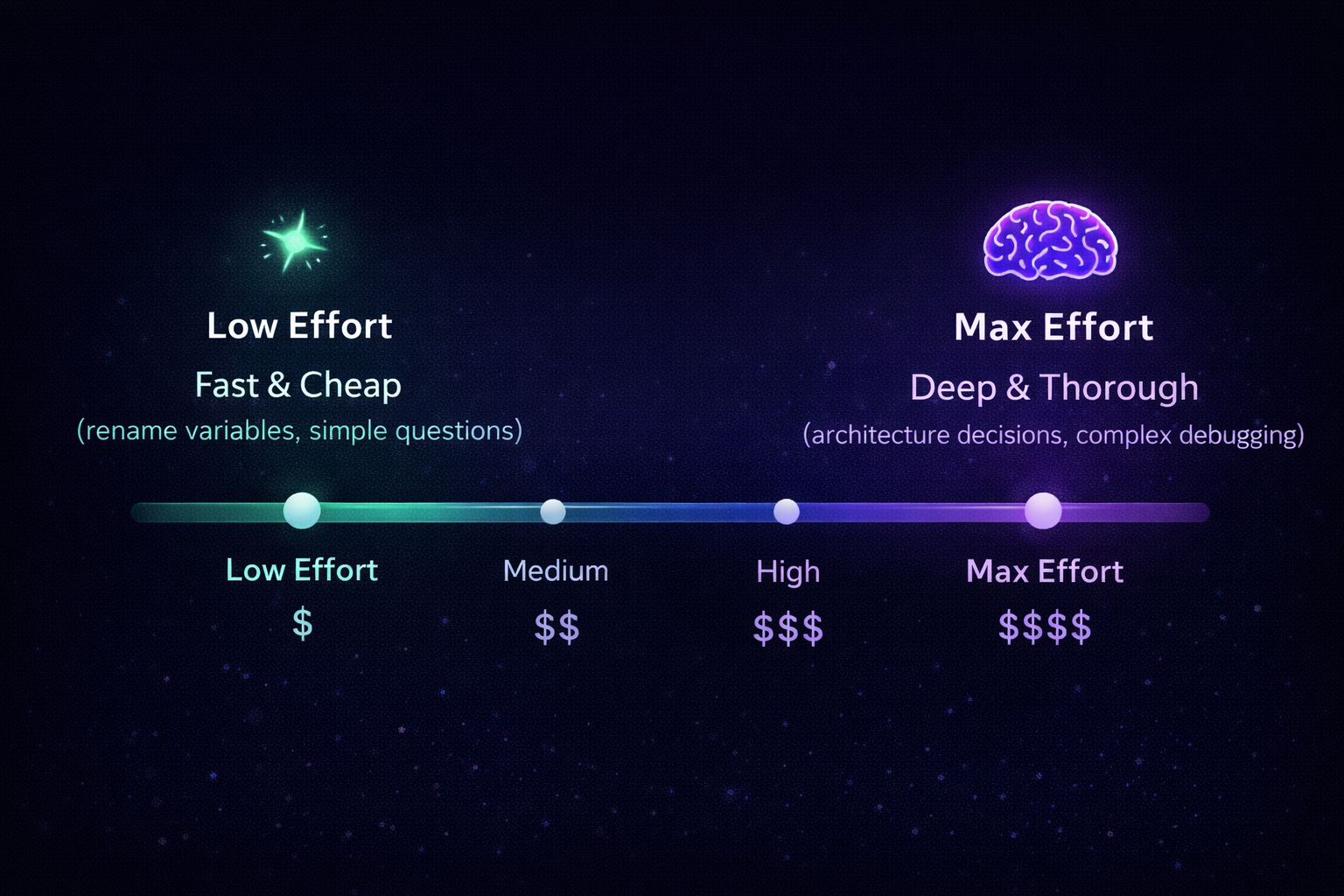
Claude Opus 4.6 introduces four effort levels (low → max). The model automatically selects the cheapest level that can satisfy the request, but you can force a higher level when you need deeper reasoning or more exhaustive code generation.
| Effort level | Typical use case | Cost impact |
|---|---|---|
| Low | Simple look‑ups, one‑line fixes | Minimal |
| Medium | Routine refactoring, standard PR review | Moderate |
| High | Complex architectural changes, multi‑service debugging | Higher |
| Max | Full‑stack feature implementation, exhaustive testing scaffolding | Highest |
How to control effort
In settings.json
{
  "defaultEffort": "medium",   // low | medium | high | max
  "allowEffortOverride": true   // let the UI expose a selector
}
Inline in a prompt
@effort=high
Please generate a complete CRUD module for the `Task` entity, including validation, service layer, and unit tests.
When to use each level
| Situation | Recommended effort |
|---|---|
| Quick typo fix or one‑liner | Low |
| Standard code review or linting | Medium |
| Cross‑service bug hunt, performance profiling | High |
| End‑to‑end feature scaffolding, design‑level reasoning | Max |
Bottom line
- Agent Teams let you parallelise read‑heavy work and keep each sub‑task’s context tidy.
- 1 M‑token context means you can hand Claude the whole repo and let it reason holistically.
- Adaptive effort levels give you fine‑grained cost control without sacrificing depth when you need it.
If you’re already using Claude Code, enable the experimental flags, start feeding larger chunks of your codebase, and let the model decide how much “thinking” power to apply. Your daily dev workflow will become faster, cheaper, and far less context‑starved.
New API Parameter: thinking.budget_tokens (Combined with Effort Levels)
// Quick rename – don't overthink it
const response = await anthropic.messages.create({
  model: "claude-opus-4-6",
  thinking: { type: "enabled", effort: "low" },
  messages: [{ role: "user", content: "Rename userId to accountId across this module" }]
});

// Complex architectural decision – go deep
const response = await anthropic.messages.create({
  model: "claude-opus-4-6",
  thinking: { type: "enabled", effort: "max" },
  messages: [{ role: "user", content: "Design the migration strategy for moving from REST to GraphQL" }]
});
Effort Levels
| Level | Description |
|---|---|
low | Minimal reasoning; fast & cheap. |
medium | Balanced reasoning and cost. |
high | Default level; thorough but efficient. |
max | Full‑blown reasoning; highest quality. |
Adaptive Mode
When thinking.type is set to adaptive, the model automatically selects the appropriate effort level:
- Simple questions → fast, inexpensive answers.
- Complex reasoning → full‑treatment responses.
Why This Matters for Costs
Running AI‑powered tools in production rarely requires maximum intelligence for every request. By leveraging adaptive thinking you can:
- Route trivial queries to faster, cheaper models.
- Reserve the most capable model (e.g., Opus) for demanding tasks.
We employ this pattern at Glinr, dynamically routing simple queries to lightweight models and delegating complex work to Opus. Adaptive thinking embeds that routing logic directly into the model, reducing latency and cost.
4. Context Compaction (Beta)
const response = await anthropic.messages.create({
  model: "claude-opus-4-6",
  context_compaction: { enabled: true },
  // ... long conversation history
});
Why it matters
- Without compaction, a 2‑hour refactoring session would exceed any context limit.
- With compaction, the model retains a summary of earlier work while keeping full detail on recent turns.
- Think of it as
git squashfor conversation history.
5. Benchmarks That Matter for Developers
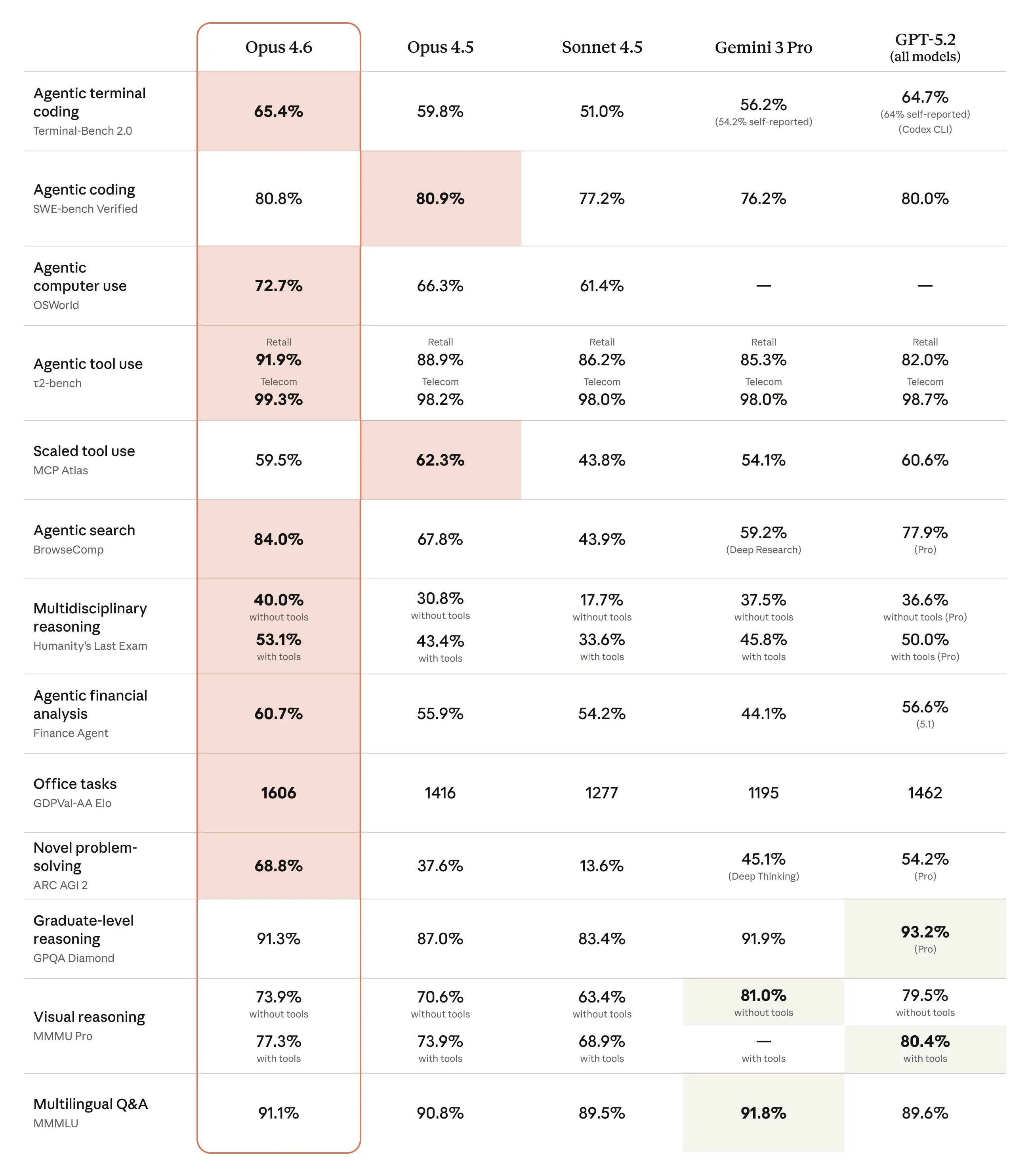
Skip the academic benchmarks. Here’s what matters for writing code:
| Benchmark | Opus 4.6 | Opus 4.5 | What It Tests |
|---|---|---|---|
| Terminal‑Bench 2.0 | 65.4 % | 59.8 % | Real‑agentic coding tasks |
| SWE‑bench Verified | 80.8 % | ~72 % | Resolving real GitHub issues |
| MRCR v2 (1 M) | 76.0 % | N/A | Long‑context retrieval |
| HLE | #1 | – | Hardest reasoning problems |
The Terminal‑Bench score is especially significant. It measures how well a model performs when given access to a full terminal environment—running tests, debugging, and iterating. A 65.4 % success rate means the model can autonomously resolve nearly two‑thirds of complex coding tasks.
6. Security: 500 + Zero‑Days Found
Before launch, Anthropic’s team had Opus 4.6 hunt for vulnerabilities in open‑source codebases. The scan uncovered 500 + previously unknown zero‑day vulnerabilities, ranging from simple crash bugs to serious memory‑corruption flaws. In one notable case, Claude automatically generated a proof‑of‑concept exploit to validate the finding.
Key takeaways
- AI can discover hundreds of critical bugs that traditional testing misses.
- Automated proof‑of‑concept generation speeds up verification and remediation.
- Leveraging AI for security audits represents a significant step change in how we protect software.
If you’re using AI for security auditing, this is a step change.
The Bottom Line

Opus 4.6 isn’t a marginal upgrade. The combination of:
- Context that actually works – 1 M tokens with 76 % retrieval accuracy
- Parallel agent teams – divide and conquer
- Adaptive effort – pay for what you need
- Context compaction – sessions that last hours, not minutes
…creates a qualitatively different tool. It’s less “AI autocomplete” and more “AI development team.”
The model is available now via claude-opus-4-6 in the API, Claude Code, and claude.ai.
We’re integrating Opus 4.6’s capabilities into Glinr — an AI task‑orchestration platform that intelligently routes between models, manages multi‑agent workflows, and tracks everything from tickets to deployments. If you’re building AI‑powered dev tools, we should talk.
Tags: ai, webdev, programming, productivity, Claude4.6, GLINR
Follow and throw a like for more content
- Medium –
- LinkedIn –
- Site –