
Building an AI-Powered Customer Churn Prediction Pipeline on AWS (Step-by-Step)
Source: Dev.to
What we achieved
- ✅ 84.2% AUC on validation data
- ✅ Real‑time predictions via SageMaker endpoint
- ✅ Natural language explanations powered by Claude (Bedrock)
🎯 What We’re Building
An end‑to‑end ML pipeline that:
| Step | Action |
|---|---|
| Ingests | Customer data into S3 |
| Trains | A churn prediction model with SageMaker XGBoost |
| Deploys | A real‑time inference endpoint |
| Explains | Predictions using Amazon Bedrock (Claude) |
| Exposes | Everything via API Gateway + Lambda |
Prerequisites: AWS account, basic Python knowledge
🏗️ Architecture Overview

The pipeline consists of 5 tiers
| Tier | Services | Purpose |
|---|---|---|
| Data Ingestion | S3 | Store raw customer data |
| ML Training | SageMaker Training | Train XGBoost model |
| Model Storage | S3 | Store model artifacts |
| Inference & AI | SageMaker Endpoint, Bedrock | Real‑time predictions + NL explanations |
| API Layer | API Gateway, Lambda | Expose REST API |
Step 1 – Set Up S3 and Upload Data
# Set bucket name with your account ID
export BUCKET_NAME=churn-prediction-$(aws sts get-caller-identity --query Account --output text)

# Create bucket
aws s3 mb s3://$BUCKET_NAME

# Upload your data
aws s3 cp WA_Fn-UseC_-Telco-Customer-Churn.csv s3://$BUCKET_NAME/raw/
📥 Dataset: Download the Telco Customer Churn dataset from Kaggle.
Step 2 – Create SageMaker IAM Role
- Open the IAM console → Roles → Create role.
- Choose SageMaker – Execution as the trusted entity.
- Attach the policies:
AmazonSageMakerFullAccessandAmazonS3FullAccess. - Name the role SageMakerChurnRole.
Step 3 – Train the Model
Create a file named train_churn.py with the following content:
import boto3
import sagemaker
import pandas as pd
import os
from sklearn.model_selection import train_test_split
from sagemaker.inputs import TrainingInput

# Config
BUCKET = os.environ['BUCKET_NAME']
ROLE   = os.environ['ROLE_ARN']
PREFIX = 'churn-prediction'

session = sagemaker.Session()
region  = session.boto_region_name

# Load and prepare data
df = pd.read_csv('WA_Fn-UseC_-Telco-Customer-Churn.csv')
df['TotalCharges'] = pd.to_numeric(df['TotalCharges'], errors='coerce').fillna(0)
df['Churn'] = (df['Churn'] == 'Yes').astype(int)

# Encode categorical columns
cat_cols = [
    'gender', 'Partner', 'Dependents', 'PhoneService', 'MultipleLines',
    'InternetService', 'OnlineSecurity', 'OnlineBackup', 'DeviceProtection',
    'TechSupport', 'StreamingTV', 'StreamingMovies', 'Contract',
    'PaperlessBilling', 'PaymentMethod'
]

for col in cat_cols:
    df[col] = df[col].astype('category').cat.codes

# Feature set
feature_cols = ['SeniorCitizen', 'tenure', 'MonthlyCharges', 'TotalCharges'] + cat_cols
X = df[feature_cols]
y = df['Churn']

# Train‑test split
X_train, X_test, y_train, y_test = train_test_split(
    X, y, test_size=0.2, random_state=42, stratify=y
)

train_df = pd.concat([y_train.reset_index(drop=True), X_train.reset_index(drop=True)], axis=1)
test_df  = pd.concat([y_test.reset_index(drop=True),  X_test.reset_index(drop=True)], axis=1)

train_df.to_csv('train.csv', index=False, header=False)
test_df.to_csv('test.csv',   index=False, header=False)

# Upload CSVs to S3
s3 = boto3.client('s3')
s3.upload_file('train.csv', BUCKET, f'{PREFIX}/train/train.csv')
s3.upload_file('test.csv',  BUCKET, f'{PREFIX}/test/test.csv')

# XGBoost container
container = sagemaker.image_uris.retrieve('xgboost', region, '1.7-1')

xgb = sagemaker.estimator.Estimator(
    image_uri=container,
    role=ROLE,
    instance_count=1,
    instance_type='ml.m5.xlarge',
    output_path=f's3://{BUCKET}/{PREFIX}/output',
    sagemaker_session=session
)

xgb.set_hyperparameters(
    objective='binary:logistic',
    num_round=100,
    max_depth=5,
    eta=0.2,
    eval_metric='auc'
)

xgb.fit({
    'train': TrainingInput(f's3://{BUCKET}/{PREFIX}/train', content_type='csv'),
    'validation': TrainingInput(f's3://{BUCKET}/{PREFIX}/test', content_type='csv')
})

# Deploy endpoint
predictor = xgb.deploy(
    initial_instance_count=1,
    instance_type='ml.t2.medium',
    endpoint_name='churn-prediction-endpoint',
    serializer=sagemaker.serializers.CSVSerializer()
)
Run the script
export BUCKET_NAME=churn-prediction-YOUR_ACCOUNT_ID
export ROLE_ARN=arn:aws:iam::YOUR_ACCOUNT_ID:role/SageMakerChurnRole
python3 train_churn.py
Sample training output
2026-01-01 00:24:27 Uploading - Uploading generated training model
2026-01-01 00:24:27 Completed - Training job completed
Training seconds: 103
Billable seconds: 103

✅ Training complete!
Model artifact: s3://churn-prediction-905418352184/churn-prediction/output/sagemaker-xgboost-2026-01-01-00-22-03-339/output/model.tar.gz

Deploying endpoint (3‑5 min)...
INFO:sagemaker:Creating model with name: sagemaker-xgboost-2026-01-01-00-24-53-959
INFO:sagemaker:Creating endpoint-config with name churn-prediction-endpoint
INFO:sagemaker:Creating endpoint with name churn-prediction-endpoint
✅ Endpoint deployed: churn-prediction-endpoint
Test prediction: 0.4% churn probability
You now have a fully functional churn‑prediction model, a real‑time SageMaker endpoint, and (in the next steps) an API layer that calls Bedrock to generate plain‑English explanations for each prediction. Stay tuned for the remaining parts of the tutorial!
Step 4 – Create Lambda with Bedrock Integration
Create a Lambda function ChurnPredictionAPI with the following code:
import json
import boto3
import os

sagemaker_runtime = boto3.client('sagemaker-runtime')
bedrock = boto3.client('bedrock-runtime')

ENDPOINT_NAME = os.environ.get('SAGEMAKER_ENDPOINT', 'churn-prediction-endpoint')

def lambda_handler(event, context):
    body = json.loads(event['body']) if isinstance(event.get('body'), str) else event

    # Get prediction from SageMaker
    response = sagemaker_runtime.invoke_endpoint(
        EndpointName=ENDPOINT_NAME,
        ContentType='text/csv',
        Body=body['features']
    )
    churn_prob = float(response['Body'].read().decode())

    # Generate explanation with Bedrock Claude
    prompt = f"""A customer has {churn_prob:.1%} churn probability.
Customer: Tenure {body.get('tenure', 'N/A')} months, ${body.get('monthly_charges', 'N/A')}/month, {body.get('contract', 'N/A')} contract.
In 2 sentences, explain the risk and suggest one retention action."""

    bedrock_response = bedrock.invoke_model(
        modelId='anthropic.claude-3-haiku-20240307-v1:0',
        body=json.dumps({
            "anthropic_version": "bedrock-2023-05-31",
            "max_tokens": 100,
            "messages": [{"role": "user", "content": prompt}]
        })
    )
    explanation = json.loads(bedrock_response['body'].read())['content'][0]['text']
    risk = "High" if churn_prob > 0.7 else "Medium" if churn_prob > 0.4 else "Low"

    return {
        'statusCode': 200,
        'headers': {'Content-Type': 'application/json'},
        'body': json.dumps({
            'churn_probability': f"{churn_prob:.1%}",
            'risk_level': risk,
            'explanation': explanation
        })
    }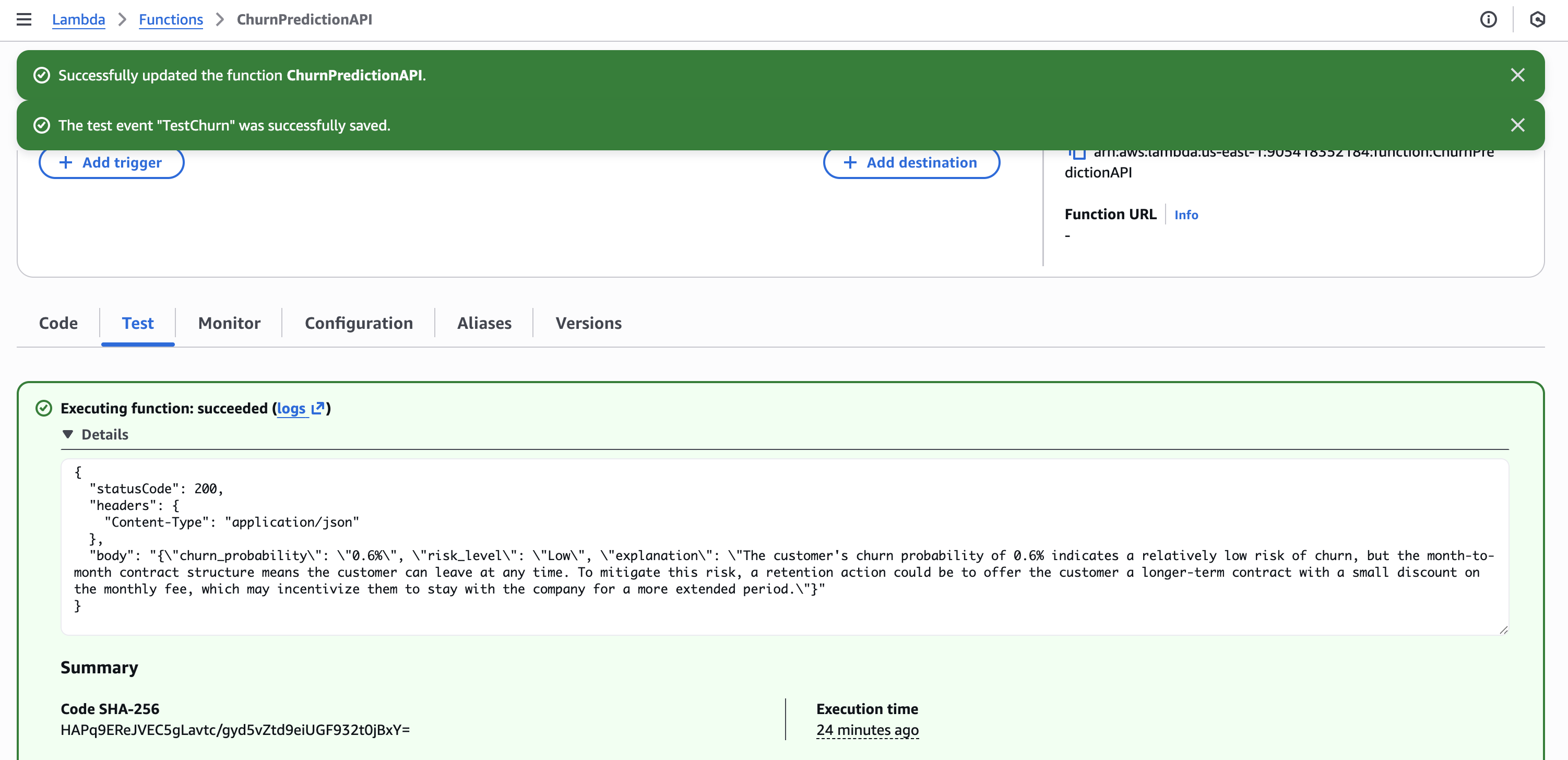
Lambda configuration
- Runtime: Python 3.11
- Timeout: 30 seconds
- Role:
LambdaChurnRole(with SageMaker + Bedrock permissions) - Environment variable:
SAGEMAKER_ENDPOINT=churn-prediction-endpoint
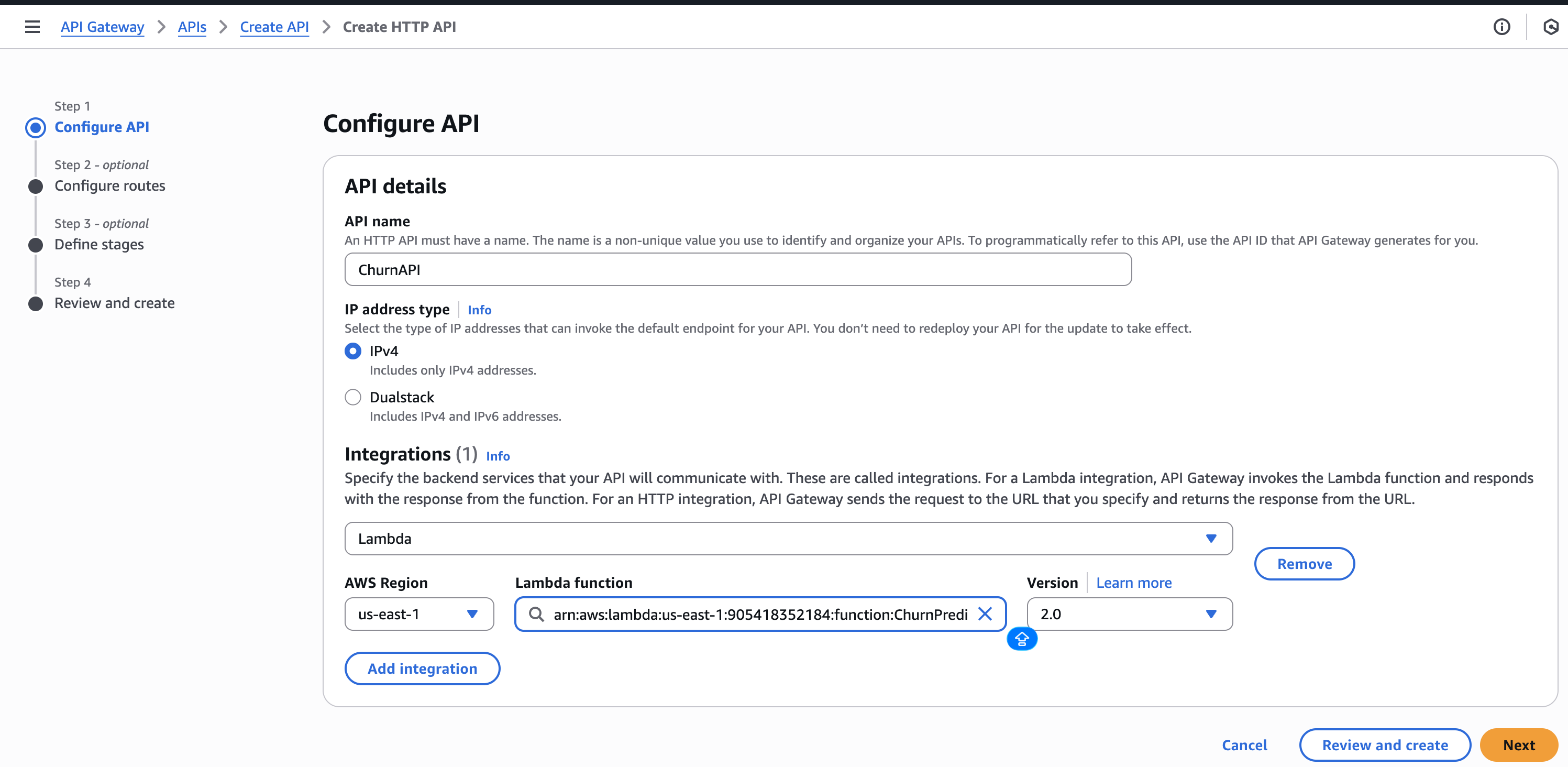
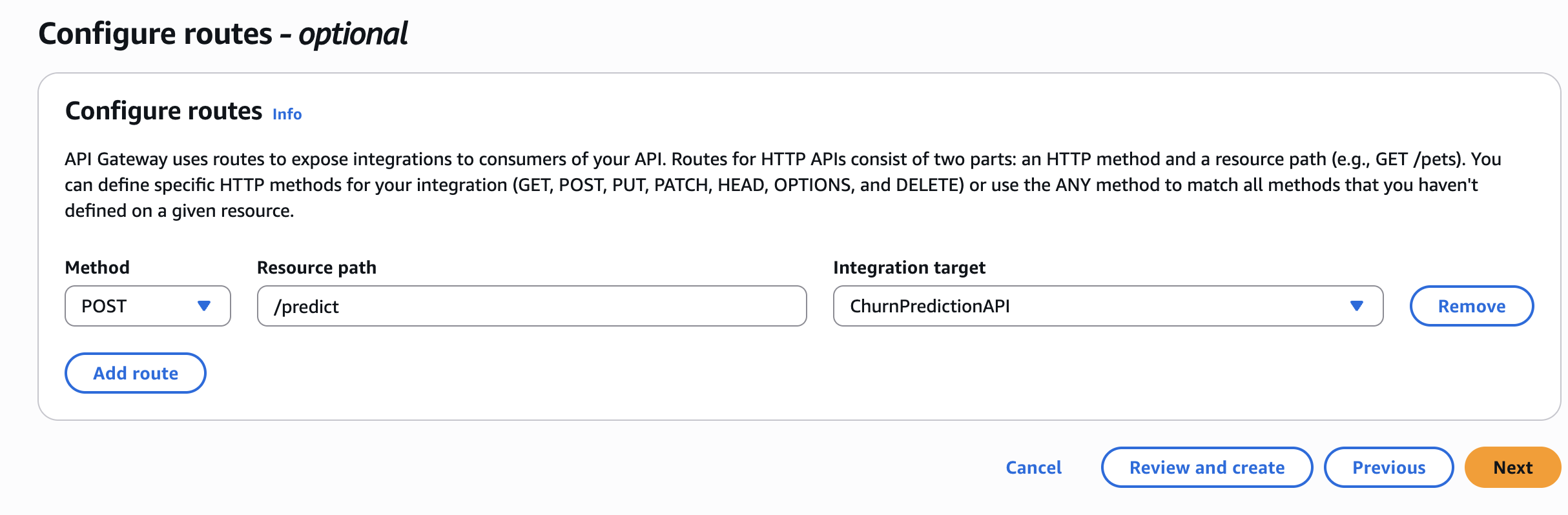
Step 5 – Create API Gateway
- Create an HTTP API in API Gateway.
- Add a Lambda integration →
ChurnPredictionAPI. - Create a POST route:
/predict. - Deploy and note the invoke URL.
🧪 Test the API
curl -X POST "https://YOUR_API_URL/predict" \
  -H "Content-Type: application/json" \
  -d '{
    "features": "0,24,65.5,1500.0,1,0,1,2,0,0,1,1,0,0,1,0,2,1,1",
    "tenure": 24,
    "monthly_charges": 65.5,
    "contract": "Month-to-month"
}'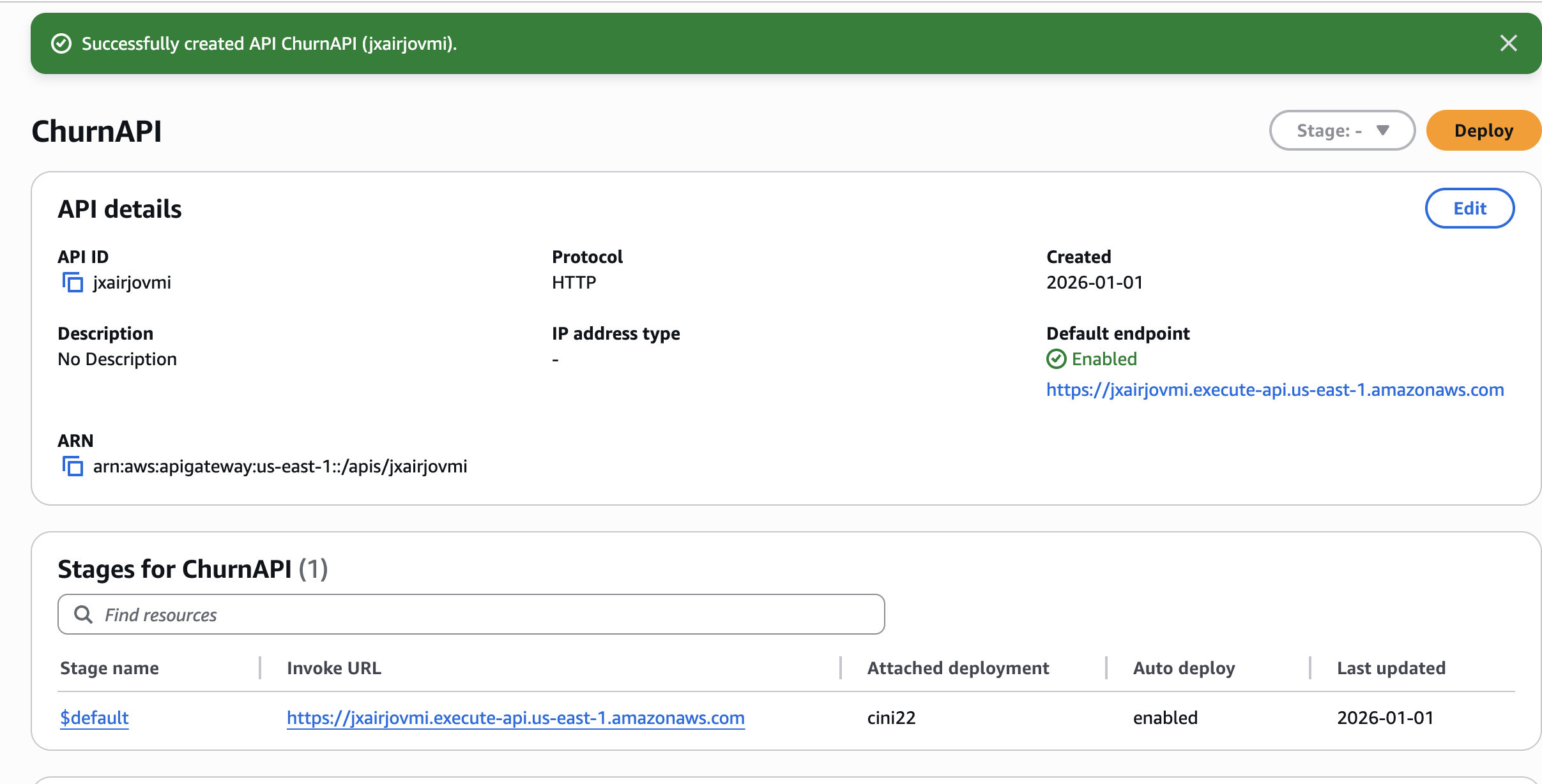
Sample response
{
  "churn_probability": "0.6%",
  "risk_level": "Low",
  "explanation": "The customer's high churn probability of 0.6% and the month-to-month contract indicate a significant risk of losing the customer. To mitigate this risk, a retention action could be to offer the customer a longer-term contract with a discounted monthly rate or additional benefits, which may help increase their loyalty and reduce the likelihood of churn."
}
🧹 Cleanup
Delete resources when you’re finished to avoid charges:
# Delete SageMaker endpoint (most expensive!)
aws sagemaker delete-endpoint --endpoint-name churn-prediction-endpoint
aws sagemaker delete-endpoint-config --endpoint-config-name churn-prediction-endpoint

# Delete Lambda
aws lambda delete-function --function-name ChurnPredictionAPI

# Delete S3 bucket
aws s3 rb s3://$BUCKET_NAME --force
💡 Key Lessons Learned
- SageMaker XGBoost is production‑ready – achieved ~84 % AUC with minimal tuning.
- Bedrock adds real business value – turning raw predictions into actionable insights makes ML accessible to non‑technical stakeholders.
- IAM permissions are tricky – creating roles via the console can help avoid “explicit deny” errors.
- Cost awareness matters – always delete expensive resources (e.g., SageMaker endpoints) when they’re no longer needed.
Endpoints When Not in Use
(~$0.05/hour adds up!)
Resources
Thanks for reading! If this helped you, follow me for more AWS + Data Engineering content.
Questions? Leave a comment below!