
Building a Production-Ready Text-to-Text API with AWS Bedrock, Lambda & API Gateway
Source: Dev.to – Building a Production‑Ready Text‑to‑Text API with AWS Bedrock, Lambda & API Gateway
Project Overview
This project demonstrates how to design and deploy a production‑ready text‑to‑text AI API using AWS Bedrock and Amazon Titan Text, exposed securely via Amazon API Gateway and powered by AWS Lambda.
The goal is to show how organizations can integrate generative‑AI capabilities into real business systems while maintaining:
- Security
- Scalability
- Cost control
- Observability
Business Use Case
Many organizations want to leverage generative AI for:
- Internal copilots
- Automated content generation
- Text summarisation
- Data explanations
- Customer‑support automation
Directly exposing foundation models to applications can introduce security, cost, and governance risks.
This project solves that by:
- Abstracting the foundation model behind a controlled API.
- Enforcing consistent prompts and parameters.
- Centralising access, logging, and cost management.
The result is a secure AI service layer that can be reused across multiple teams and applications.
Architecture Overview
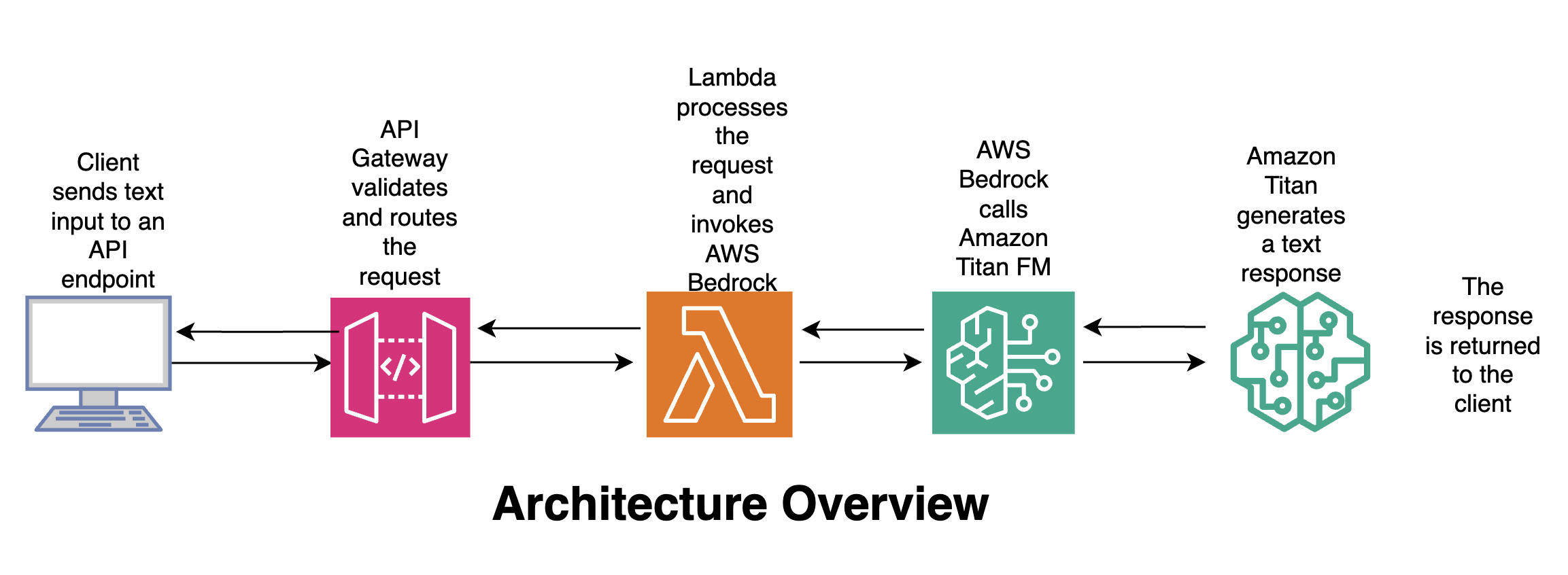
Flow
- Client – Sends text input to an API endpoint.
- API Gateway – Validates and routes the request.
- Lambda – Processes the request and invokes AWS Bedrock.
- Amazon Titan – Generates a text response.
- Client – Receives the response.
🛠️ Tools & Services Used
| Service | Why it’s used |
|---|---|
| AWS Bedrock | Fully managed service for accessing foundation models; no infrastructure to manage; enterprise‑grade security; pay‑per‑use pricing. |
Amazon Titan Text (amazon.titan-text-express-v1) | Fast, cost‑efficient text generation; ideal for text‑to‑text use cases; deterministic behaviour with low temperature; built for enterprise workloads. |
| AWS Lambda | Serverless compute for business logic; handles request validation and AI invocation; scales automatically. |
| Amazon API Gateway | Securely exposes the AI service as a REST API; provides authentication, throttling, and monitoring; acts as the public interface for applications. |
| Python (Boto3) | AWS SDK for invoking Bedrock; lightweight and production‑friendly. |
🧠 Why This Design Matters
- Stateless AI calls – foundation models do not retain memory.
- Explicit control – prompts and parameters are centrally managed.
- Security‑first – IAM‑controlled access to Bedrock.
- Cost management – token limits and model choice are enforced.
- Reusability – multiple applications can consume the same API.
This mirrors how AI platforms are built in regulated and enterprise environments.
🧩 AWS Lambda: Text‑to‑Text Processing Logic
This example shows a Python AWS Lambda function that:
- Receives text from API Gateway.
- Calls Amazon Bedrock (Titan Text model).
- Returns the generated response.
The Lambda acts as a controlled AI‑service layer between your applications and the foundation model.
1. Create the Lambda Function
| Step | Action |
|---|---|
| 1 | Open AWS Management Console → Lambda. |
| 2 | Click Create function. |
| 3 | Choose Author from scratch. |
| 4 | Enter a name (e.g., bedrock-text-to-text). |
| 5 | Select Python 3.x as the runtime. |
| 6 | Accept the defaults and click Create function. |
2. Add the Function Code
Replace the default code with the implementation from the GitHub repository.
import json
import boto3
import os

# Initialise Bedrock client
bedrock = boto3.client(
    "bedrock-runtime",
    region_name=os.getenv("AWS_REGION")
)

def lambda_handler(event, context):
    """Handle API‑Gateway request, invoke Titan Text, and return the result."""
    # 1️⃣ Extract the text payload from the request body
    body = json.loads(event.get("body", "{}"))
    user_input = body.get("input", "")

    if not user_input:
        return {
            "statusCode": 400,
            "body": json.dumps({"error": "Missing 'input' in request body"})
        }

    # 2️⃣ Build the request payload for Titan Text
    payload = {
        "prompt": user_input,
        "temperature": 0.0,
        "maxTokens": 1024,
        "topP": 0.9,
        "stopSequences": []
    }

    # 3️⃣ Invoke the model
    try:
        response = bedrock.invoke_model(
            body=json.dumps(payload).encode("utf-8"),
            modelId="amazon.titan-text-express-v1",
            contentType="application/json",
            accept="application/json"
        )
        result = json.loads(response["body"].read())
        generated_text = result.get("completion", "")

        return {
            "statusCode": 200,
            "body": json.dumps({"output": generated_text})
        }

    # 4️⃣ Error handling
    except Exception as e:
        print(f"Error invoking Bedrock: {e}")
        return {
            "statusCode": 500,
            "body": json.dumps({"error": "Internal server error"})
        }
3. Adjust Lambda Settings
| Setting | Recommended Value | Notes |
|---|---|---|
| Timeout | 30 seconds (or higher) | Allows enough time for the model call. |
| Memory | 256 MiB | Sufficient for most text‑to‑text workloads. |
| Environment Variables | AWS_REGION (if not automatically set) | Required for the Bedrock client. |
Now the Lambda is ready to receive text via API Gateway, forward it to Amazon Titan Text, and return the generated output. 🎉
🔐 Required IAM Permissions
The Lambda execution role must be allowed to invoke Bedrock models. (Lambda already has permission to write logs to CloudWatch.)
- In the Lambda console, go to Configuration → Permissions.
- Click the Role name to open the IAM role.
- Attach the following inline policy (or add it to an existing policy):
{
  "Version": "2012-10-17",
  "Statement": [
    {
      "Sid": "AllowInvokeTitanText",
      "Effect": "Allow",
      "Action": [
        "bedrock:InvokeModel"
      ],
      "Resource": [
        "arn:aws:bedrock:*:*:model/amazon.titan-text-express-v1"
      ]
    }
  ]
}
Tip: If you plan to use additional Bedrock models, add their ARNs to the
Resourcearray.
📡 Expose the Lambda via API Gateway
- Create a new API – In API Gateway, choose REST API (or HTTP API for a lighter footprint).
- Add a POST method – Create a
/generateresource and add a POST method. - Configure the integration – Set Integration type to Lambda Function and select the Lambda you created.
- Enable CORS (if the API will be called from browsers).
- (Optional) Attach an authorizer – e.g., Cognito, JWT, etc., to enforce authentication.
- Deploy the API – Deploy to a stage (e.g.,
prod).
🚀 Test the End‑to‑End Flow
curl -X POST https://<api-id>.execute-api.<region>.amazonaws.com/prod/generate \
  -H "Content-Type: application/json" \
  -d '{"input":"Explain the benefits of serverless architectures in 2 sentences."}'
Expected JSON response
{
  "output": "Serverless architectures eliminate the need to manage infrastructure, allowing developers to focus on code. They also provide automatic scaling and pay‑as‑you‑go pricing, reducing operational costs."
}
📚 Further Reading & Resources
- AWS Bedrock Documentation – https://docs.aws.amazon.com/bedrock/
- Amazon Titan Text Model Card – https://aws.amazon.com/bedrock/titan-text/
- Best Practices for Serverless APIs – https://aws.amazon.com/blogs/compute/best-practices-for-building-serverless-apis/
{
  "Resource": [
    "arn:aws:bedrock:us-east-1::foundation-model/amazon.titan-text-express-v1"
  ]
}
🌐 API Gateway Request Example
-
Create API – In the API Gateway console click Create API → REST API → Build.

-
Create a resource – In Resources click Create resource, enter a name, and create it.

-
Create a method – Click Create Method, select POST, choose Lambda function integration, enable Lambda proxy integration, and select your Lambda.

-
Deploy the API – Click Deploy API, create a new stage, name it, and deploy.

-
Copy the Invoke URL – On the Stage details page, copy the Invoke URL and test with any client (e.g., Postman).

Test Request (Postman)
POST https://05q0if5orb.execute-api.us-east-1.amazonaws.com/prod/text
Content-Type: application/json

{
  "text": "what is Amazon Bedrock"
}
✅ API Response Example
{
  "response": "\nAmazon Bedrock is the name of AWS’s managed service for managing the underlying infrastructure that powers your intelligent bot. It is a collection of services that you can use to build, deploy, and scale intelligent bots at scale. Amazon Bedrock is a managed service that makes foundation models from leading AI startup and Amazon’s own Titan models available through APIs. For up‑to‑date information on Amazon Bedrock and how 3P models are approved, endorsed or selected please see the provided documentation and relevant FAQs."
}
🧠 Why This Lambda Design Matters
- Keeps foundation models behind a secure API.
- Enforces consistent parameters (temperature, token limits).
- Prevents direct client access to Bedrock.
- Enables logging, monitoring, and governance.
This pattern is commonly used to build enterprise AI platforms.
📦 Example Use Cases
- Text summarization API
- AI‑powered content generation service
- Analytics explanation engine
- Internal AI assistant backend
- Secure GenAI microservice