
Building a Neon-Soaked Last.fm Roast Bot for $1.75/Year
Source: Dev.to
Building the Bot 🤖
I went to Poe and created a new bot using their ScriptBot feature. I gave it a specific system prompt roughly like this:
“You are a pretentious music critic. Your job is to analyze Last.fm profiles and roast them mercilessly. Be sarcastic, use slang, and do not hold back.”
After iterating back and forth with the ScriptBot until I was satisfied with the results, I had the intelligence (lastfm-roaster), but I needed to get the output out of Poe and into my email.

Keys and Secrets 🗝️
We are going to use GitHub Actions to run this, which means we need to keep our API keys safe. Never hard‑code passwords in your script!
1️⃣ Get the Keys
| Key | How to obtain |
|---|---|
| Poe API Key | Go to and copy your key. |
| Gmail App Password | In Google Account → Security → 2‑Step Verification → App Passwords, generate a 16‑character password for “Mail”. |
2️⃣ Store Them in GitHub
- Create a new private repository on GitHub.
- Navigate to Settings → Secrets and variables → Actions.
- Add the following three secrets:
POE_API_KEYEMAIL_ADDRESSEMAIL_PASSWORD

Step 3: The Code 🐍
requirements.txt
openai
markdown
(Yes, we use openai! Poe’s API is compatible with the OpenAI client, making it super easy to use. Gemini 2.5 Flash is referenced via the Poe API, so I don’t have to manage a separate key.)
The “Neon” Script – lastfm_roast.py
import os
import smtplib
import markdown
import re
import itertools
from email.message import EmailMessage
from openai import OpenAI

# Configs (loaded safely from GitHub Secrets)
POE_API_KEY = os.environ.get("POE_API_KEY")
EMAIL_ADDRESS = os.environ.get("EMAIL_ADDRESS")
EMAIL_PASSWORD = os.environ.get("EMAIL_PASSWORD")
LASTFM_URL = "https://www.last.fm/user/profoundlypaige"

# --- NEON PALETTE ---
# A list of bright colors that look good on dark backgrounds
# (Pink, Cyan, Green, Orange, Purple, Yellow)
COLORS = ["#FF79C6", "#8BE9FD", "#50FA7B", "#FFB86C", "#BD93F9", "#F1FA8C"]

def get_roast():
    """Pings the Poe API to get the roast."""
    client = OpenAI(api_key=POE_API_KEY, base_url="https://api.poe.com/v1")
    try:
        print("🔥 Fetching roast from Poe...")
        response = client.chat.completions.create(
            model="lastfm-roaster",
            messages=[{"role": "user", "content": f"Roast my music taste: {LASTFM_URL}"}],
        )
        return response.choices[0].message.content
    except Exception as e:
        return f"Error fetching roast: {e}"

def inject_colors(html_content):
    """
    Finds every <b> tag and injects a different color from the palette.
    """
    color_cycle = itertools.cycle(COLORS)

    def replace_match(match):
        next_color = next(color_cycle)
        # Returns <b style="color: #...">...</b>
        return f''

    # Regex to replace <b> with the colored version
    return re.sub(r'', replace_match, html_content)

def create_html_email(roast_text):
    # 1. Convert Markdown to basic HTML
    raw_html = markdown.markdown(roast_text)

    # 2. Inject the rotating neon colors into bold tags
    colorful_html = inject_colors(raw_html)

    # 3. Wrap in the styled container
    html_template = f"""


        body {{ margin: 0; padding: 0; background-color: #121212; font-family: 'Helvetica Neue', Helvetica, Arial, sans-serif; }}
        .container {{
            max-width: 600px;
            margin: 40px auto;
            background-color: #1e1e1e;
            border-radius: 8px;
            padding: 20px;
            color: #f8f8f2;
        }}
        a {{ color: #8be9fd; }}


            {colorful_html}


    """
    return html_template

def send_email(html_content):
    msg = EmailMessage()
    msg["Subject"] = "Your Daily Last.fm Roast"
    msg["From"] = EMAIL_ADDRESS
    msg["To"] = EMAIL_ADDRESS
    msg.set_content("Your email client does not support HTML.", subtype="plain")
    msg.add_alternative(html_content, subtype="html")

    with smtplib.SMTP_SSL("smtp.gmail.com", 465) as smtp:
        smtp.login(EMAIL_ADDRESS, EMAIL_PASSWORD)
        smtp.send_message(msg)
        print("📧 Email sent!")

if __name__ == "__main__":
    roast = get_roast()
    html_email = create_html_email(roast)
    send_email(html_email)
GitHub Actions Workflow
Create .github/workflows/roast.yml:
name: Daily Last.fm Roast

on:
  schedule:
    - cron: "0 8 * * *"   # Runs every day at 08:00 UTC
  workflow_dispatch:      # Allows manual runs

jobs:
  roast:
    runs-on: ubuntu-latest
    steps:
      - name: Checkout repository
        uses: actions/checkout@v4

      - name: Set up Python
        uses: actions/setup-python@v5
        with:
          python-version: "3.12"

      - name: Install dependencies
        run: pip install -r requirements.txt

      - name: Run roast script
        env:
          POE_API_KEY: ${{ secrets.POE_API_KEY }}
          EMAIL_ADDRESS: ${{ secrets.EMAIL_ADDRESS }}
          EMAIL_PASSWORD: ${{ secrets.EMAIL_PASSWORD }}
        run: python lastfm_roast.py
TL;DR
- Create a Poe ScriptBot (
lastfm-roaster). - Store API keys in GitHub Secrets.
- Write
lastfm_roast.py– fetches a roast, injects neon colors, and emails it. - Add a GitHub Actions workflow to run the script daily.
Now you’ll never have to hide that embarrassing track again – you’ll just get a daily dose of sarcastic, color‑popping humiliation, ready to share with friends. Enjoy!
Cleaned Markdown Content
Below is the cleaned‑up version of the original markdown segment. All headings, code blocks, images, and other elements have been preserved, but the formatting has been tidied for readability.
CSS & HTML Template
    .container {
        max-width: 800px;
        margin: 0 auto;
        background: #1e1e1e;
        color: #d1d5db;
        font-family: "Helvetica Neue", Helvetica, Arial, sans-serif;
        border-radius: 16px;
        overflow: hidden;
        box-shadow: 0 10px 30px rgba(0,0,0,0.5);
        border: 1px solid #333;
    }

    .header {
        background: linear-gradient(135deg, #2b2b2b 0%, #1a1a1a 100%);
        padding: 30px;
        text-align: center;
        border-bottom: 2px solid #333;
    }

    /* Gradient title text */
    .header h1 {
        margin: 0;
        font-size: 28px;
        letter-spacing: 2px;
        text-transform: uppercase;
        background: -webkit-linear-gradient(#FF79C6, #8BE9FD);
        -webkit-background-clip: text;
        -webkit-text-fill-color: transparent;
    }

    .content {
        padding: 30px;
        color: #d1d5db;
        line-height: 1.7;
        font-size: 16px;
    }

    h2 {
        color: #ffffff;
        border-left: 5px solid #BD93F9; /* Purple accent */
        padding-left: 15px;
        margin-top: 30px;
        text-transform: uppercase;
        font-size: 18px;
        letter-spacing: 1px;
    }

    ul { padding-left: 20px; }
    li { margin-bottom: 10px; }

    /* Link styles */
    a {
        color: #8BE9FD;
        text-decoration: none;
        border-bottom: 1px dotted #8BE9FD;
    }

    .footer {
        background-color: #121212;
        padding: 20px;
        text-align: center;
        font-size: 12px;
        color: #555;
    }
## 🔥 The Daily Burn
{colorful_html}
Served fresh by Poe API, Gemini 2.5 Flash, & GitHub Actions
[View your tragic Last.fm Profile]({LASTFM_URL})Python Email‑Sending Script
def create_html_email(roast_text):
html_template = f"""
Daily Roast
{CSS_BLOCK}
## 🔥 The Daily Burn

{colorful_html}

Served fresh by Poe API, Gemini 2.5 Flash, & GitHub Actions

[View your tragic Last.fm Profile]({LASTFM_URL})
"""
return html_template
def send_email(roast_text):
msg = EmailMessage()
msg["Subject"] = "Your Daily Last.fm Roast 🎸"
msg["From"] = EMAIL_ADDRESS
msg["To"] = EMAIL_ADDRESS
msg.set_content(roast_text)
msg.add_alternative(create_html_email(roast_text), subtype='html')
try:
with smtplib.SMTP_SSL("smtp.gmail.com", 465) as smtp:
smtp.login(EMAIL_ADDRESS, EMAIL_PASSWORD)
smtp.send_message(msg)
print("✅ Email sent successfully!")
except Exception as e:
print(f"❌ Failed to send email: {e}")
if __name__ == "__main__":
roast = get_roast()
send_email(roast)Automating with GitHub Actions 🤖
Create .github/workflows/daily_roast.yml:
name: Daily Lastfm Roast
on:
  schedule:
    - cron: '0 12 * * *' # Noon UTC, every day

jobs:
  roast:
    runs-on: ubuntu-latest
    steps:
      - uses: actions/checkout@v2
      - uses: actions/setup-python@v2
        with:
          python-version: '3.9'
      - run: pip install -r requirements.txt
      - run: python lastfm_roast.py
        env:
          POE_API_KEY: ${{ secrets.POE_API_KEY }}
          EMAIL_ADDRESS: ${{ secrets.EMAIL_ADDRESS }}
          EMAIL_PASSWORD: ${{ secrets.EMAIL_PASSWORD }}
Is it worth it? 💸
This is my favorite part. Poe charges Compute Points to run the model (I used Gemini 2.5 Flash). After a few test runs I logged the costs:
| Metric | Value |
|---|---|
| Model | Gemini 2.5 Flash |
| Cost per Request | ~161 Compute Points |
| Dollar Cost | ~$0.0048 per roast |
Annual cost:
$0.0048 × 365 days = $1.75$1.75 per year – for less than two bucks you get a state‑of‑the‑art LLM that analyses your listening trends and tells you your taste in indie pop is “derivative and sad” every morning. High‑value ROI! 📈
The Result: Before vs. After
Before (Chat Interface):
- Trapped in an app.
- Hard to share.
- Plain markdown text.
After (The Neon Upgrade):
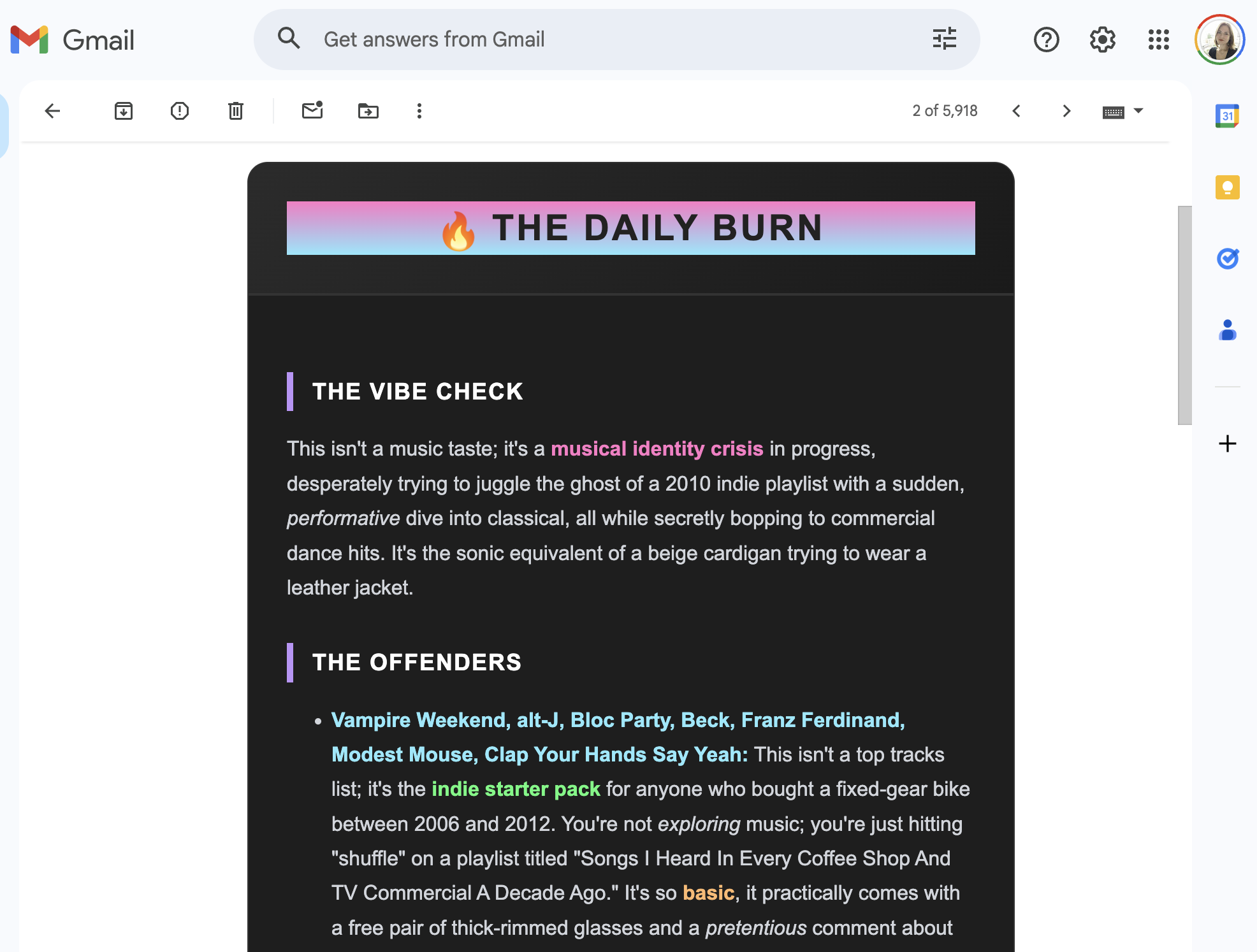
Now the email shows a sleek, dark‑mode card. Band names (the targets of the insults) are highlighted in pink, cyan, and green, making it impossible to miss who you’re being mocked for listening to. Because it’s an email, you can instantly forward the roast to friends so they can laugh at your pain too.
Wrapping Up
# (Custom Bot + API + HTML Generation + Actions)

This is my go‑to setup for almost all of my personal automation. It’s robust, free to host, and creates genuinely fun daily interactions.

## Repositories mentioned

- [lastfm‑roaster on Poe](https://poe.com/lastfm-roaster)
- [Poe API Documentation](https://developer.poe.com/)
- [Gemini Developer Documentation](https://ai.google.dev/)

---

Let me know in the comments if you try this out, or share the worst roast the AI gave you. Happy coding! ✨