
Building a dbt Incremental Model for Parsing and Chunking PDFs for Snowflake Cortex Search Service
Source: Dev.to
Building an Incremental dbt Model for Cortex Search Service (RAG)
*This is an English translation of the original article:
*
To build Retrieval‑Augmented Generation (RAG) using Cortex Search Service, you first need a table that contains documents (e.g., PDFs) parsed with functions such as AI_PARSE_DOCUMENT.
Below is a complete walkthrough of how to create that table using dbt.
The dbt Model Implementation
The model parses and chunks PDF files stored in an S3 bucket (Snowflake customer case‑study PDFs).
Key points:
- Incremental model –
unique_key='relative_path'andincremental_strategy='delete+insert'.
Files with the same path are deleted and re‑inserted on each run. - Skips processing when a record with the same path and an equal or newer
last_modifiedtimestamp already exists, saving onAI_PARSE_DOCUMENTcosts. - Chunking uses
SNOWFLAKE.CORTEX.SPLIT_TEXT_MARKDOWN_HEADER.
The approach follows a blog post by Takada‑san from Snowflake.
{{
    config(
        materialized='incremental',
        unique_key='relative_path',
        incremental_strategy='delete+insert'
    )
}}

with directory_files as (

    select
        relative_path,
        last_modified,
        TO_FILE('@RAW_DB.SAMPLE_SOURCE_SNOWPIPE.STAGE_CORPUS_SAMPLE', relative_path) as doc_file
    from
        DIRECTORY(@RAW_DB.SAMPLE_SOURCE_SNOWPIPE.STAGE_CORPUS_SAMPLE) as d
    where
        relative_path like 'snowflake-case-studies/%.pdf'
        {% if is_incremental() %}
        and not exists (
            select 1
            from {{ this }} as t
            where t.relative_path = d.relative_path
              and t.last_modified >= d.last_modified
        )
        {% endif %}

),

parsed as (

    select
        relative_path,
        last_modified,
        SNOWFLAKE.CORTEX.AI_PARSE_DOCUMENT(
            doc_file,
            {'mode': 'LAYOUT', 'page_split': TRUE}
        ) as parsed_result
    from
        directory_files

),

concatenated as (

    select
        p.relative_path,
        p.last_modified,
        LISTAGG(f.value:content::varchar, '\n\n')
            within group (order by f.index) as full_content
    from
        parsed as p,
        lateral flatten(input => p.parsed_result:pages) as f
    group by
        p.relative_path, p.last_modified

),

chunked as (

    select
        c.relative_path,
        c.last_modified,
        ch.value:headers:header_1::varchar as header_1,
        ch.value:headers:header_2::varchar as header_2,
        ch.value:headers:header_3::varchar as header_3,
        ch.value:chunk::varchar          as chunk,
        ch.index                         as chunk_index
    from
        concatenated as c,
        lateral flatten(
            input => SNOWFLAKE.CORTEX.SPLIT_TEXT_MARKDOWN_HEADER(
                c.full_content,
                OBJECT_CONSTRUCT('#', 'header_1', '##', 'header_2', '###', 'header_3'),
                10000
            )
        ) as ch

)

select
    SHA2(relative_path || ':' || chunk_index, 256) as doc_chunk_id,
    relative_path,
    SPLIT_PART(relative_path, '/', -1)                     as file_name,
    REPLACE(REPLACE(SPLIT_PART(relative_path, '/', -1),
                   'Case_Study_', ''), '.pdf', '')          as case_study_name,
    header_1,
    header_2,
    header_3,
    chunk_index,
    chunk,
    last_modified,
    CURRENT_TIMESTAMP() as _parsed_at
from
    chunked
;
dbt_project.yml – Hooks for Stage Refresh & Change Tracking
name: 'sample_dbt_project'
version: '1.9.0'
config-version: 2

profile: 'sample_project'

models:
  sample_dbt_project:
    corpus:
      sample:
        +schema: corpus_sample
        +pre-hook:
          - "ALTER STAGE RAW_DB.SAMPLE_SOURCE_SNOWPIPE.STAGE_CORPUS_SAMPLE REFRESH"
        +post-hook:
- "ALTER TABLE {{ this }} SET CHANGE_TRACKING = TRUE"- Pre‑hook – Refreshes the external stage that points to the S3 bucket, ensuring the directory table reflects the latest files before the model runs.
- Post‑hook – Enables
CHANGE_TRACKINGon the resulting table, a requirement for Cortex Search Service.
First dbt Model Run & Cortex Search Service Setup
I started with only two PDFs in S3 (Bourbon and Aisan Takaoka case studies).
(Stage‑creation statements are omitted for brevity.)
Directory view in S3

Resulting table after dbt build
Running dbt build creates a Snowflake table containing the parsed and chunked PDFs:

Next Steps
- Create a Cortex Search Service index that points to the table generated above.
- Ingest the data (the
doc_chunk_idcolumn will be used as the document identifier). - Query the index from your RAG application to retrieve relevant chunks based on user prompts.
With the incremental dbt model in place, any new or updated PDFs added to the S3 bucket will be automatically parsed, chunked, and made searchable with minimal manual effort.
Creating a Cortex Search Service and Agent for the dbt Model
Below are the SQL statements used to create the Cortex Search Service and Cortex Agent for the dbt model.
-- Create Cortex Search Service
CREATE OR REPLACE CORTEX SEARCH SERVICE PROD_DB.AIML_SAMPLE.CSS_SNOWFLAKE_CASE_STUDIES
    ON chunk
    ATTRIBUTES file_name,
               case_study_name,
               header_1,
               header_2,
               header_3,
               chunk_index,
               last_modified
    WAREHOUSE = CORTEX_SEARCH_WH
    TARGET_LAG = '365 day'
    EMBEDDING_MODEL = 'voyage-multilingual-2'
    INITIALIZE = ON_CREATE
    COMMENT = 'Cortex Search Service for chunked Snowflake customer case study PDFs'
AS
SELECT
    file_name,
    case_study_name,
    header_1,
    header_2,
    header_3,
    chunk_index,
    chunk,
    last_modified
FROM PROD_DB.CORPUS_SAMPLE.COR_SNOWFLAKE_CASE_STUDIES_PARSED;

-- Create Agent
CREATE OR REPLACE AGENT PROD_DB.AIML_SAMPLE.AGENT_SNOWFLAKE_CASE_STUDIES
    COMMENT = 'Cortex Agent for searching and answering questions about Snowflake customer case study PDFs'
    PROFILE = '{"display_name": "Snowflake Case Study Search", "avatar": "search", "color": "#29B5E8"}'
    FROM SPECIFICATION
    $$
    instructions:
      system: |
        You are an assistant that answers questions about the content of Snowflake customer case study PDFs.
        Use the Cortex Search Service to search for relevant case study information
        and provide answers based on accurate information.
        If the information is not found in the search results, do not speculate — inform the user accordingly.
      response: |
        Please respond concisely.
        Include the referenced case study name (case_study_name) in your answer.

    tools:
      - tool_spec:
          type: "cortex_search"
          name: "SearchCaseStudies"
          description: "Search Snowflake customer case study PDFs"

    tool_resources:
      SearchCaseStudies:
        name: "PROD_DB.AIML_SAMPLE.CSS_SNOWFLAKE_CASE_STUDIES"
        max_results: "5"
    $$;

-- Add to Snowflake Intelligence
ALTER SNOWFLAKE INTELLIGENCE SNOWFLAKE_INTELLIGENCE_OBJECT_DEFAULT
    ADD AGENT PROD_DB.AIML_SAMPLE.AGENT_SNOWFLAKE_CASE_STUDIES;
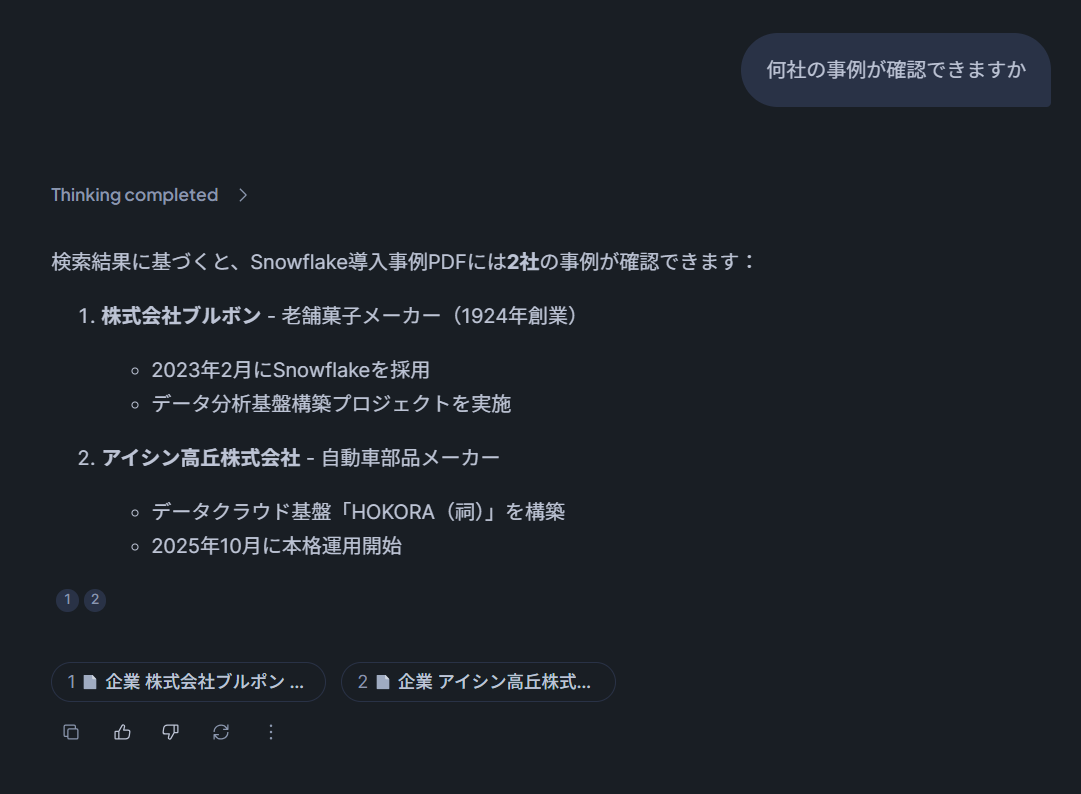
Results from Snowflake Intelligence
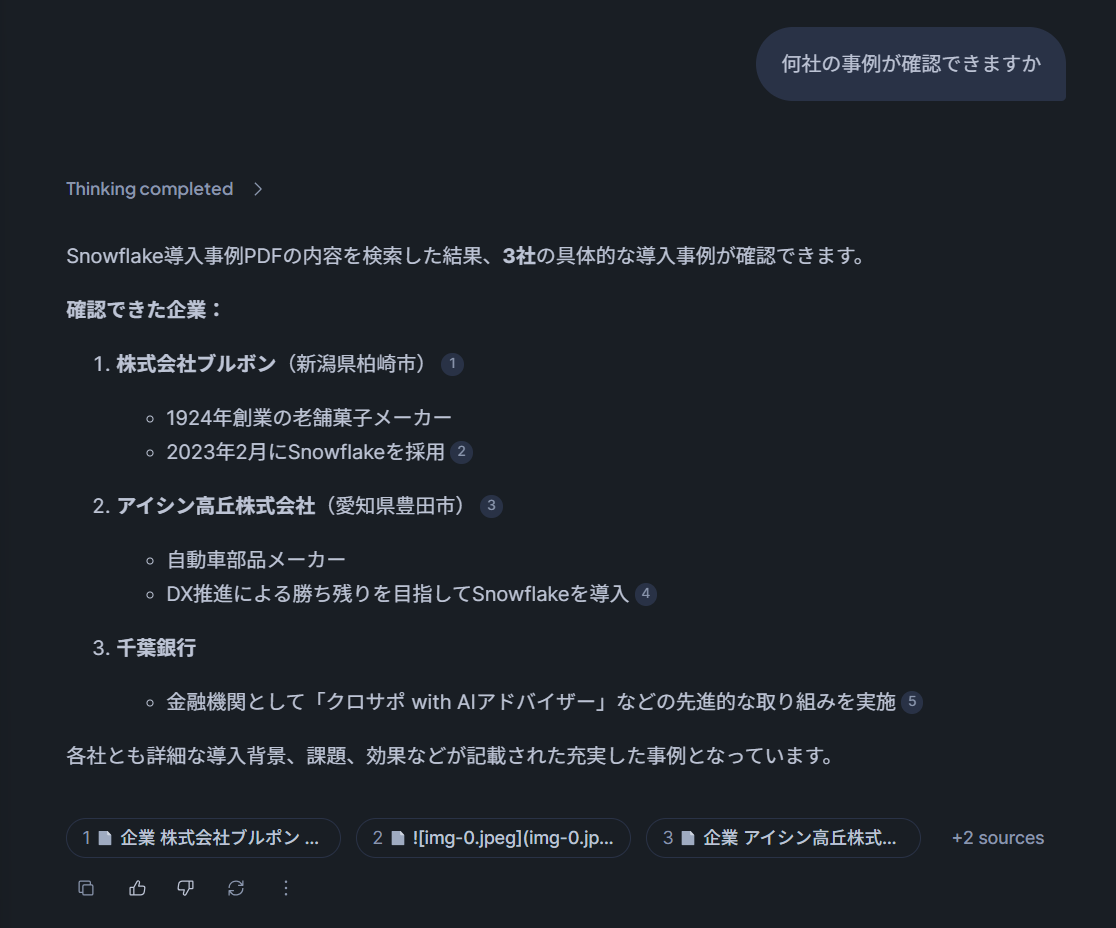
After running a query through Snowflake Intelligence, the response looked like this:
Updating S3 Data and Running the dbt Model a Second Time
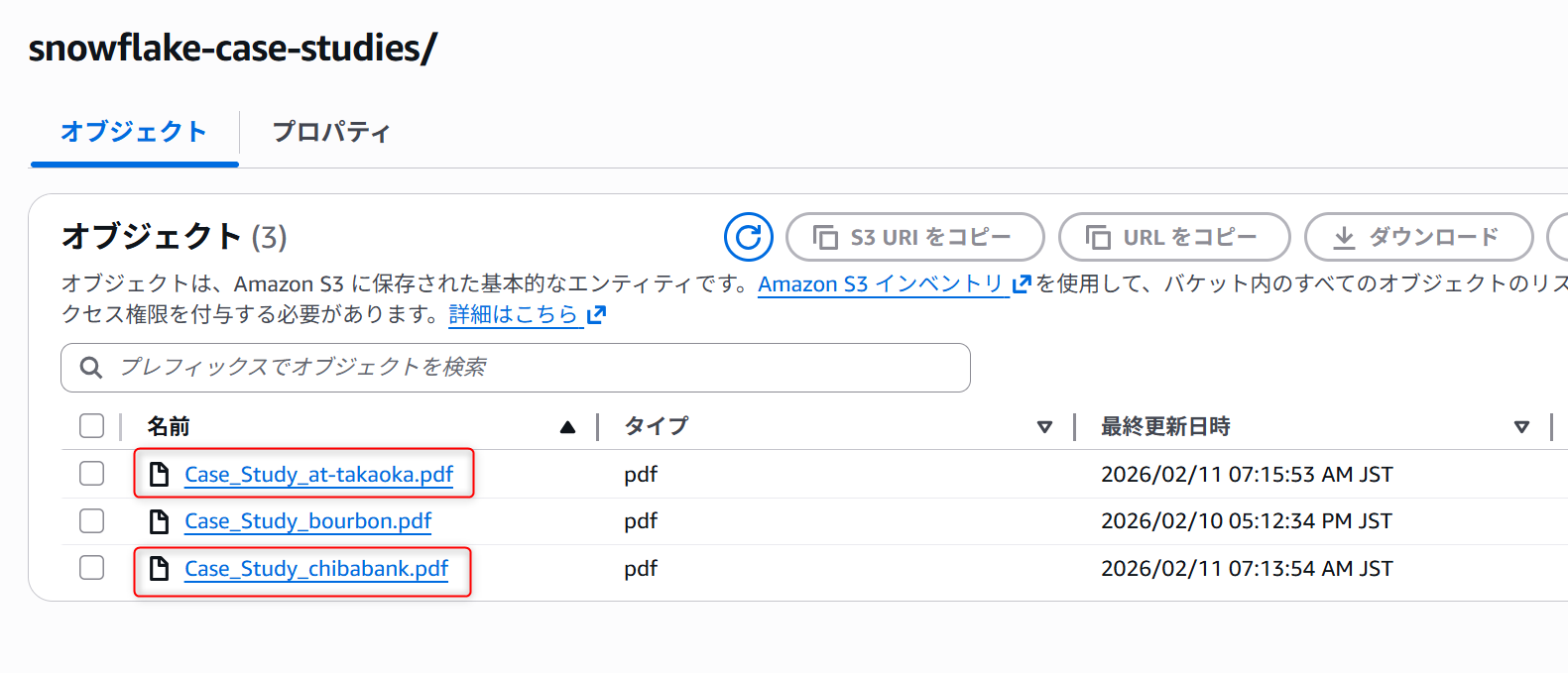
To verify that incremental updates work correctly, two changes were made to the S3 bucket:
- Deleted the 2nd page of the Aisan Takaoka case‑study PDF and re‑uploaded it with the same file name.
- Added a new Chiba Bank case‑study PDF to the bucket.
dbt Build Output
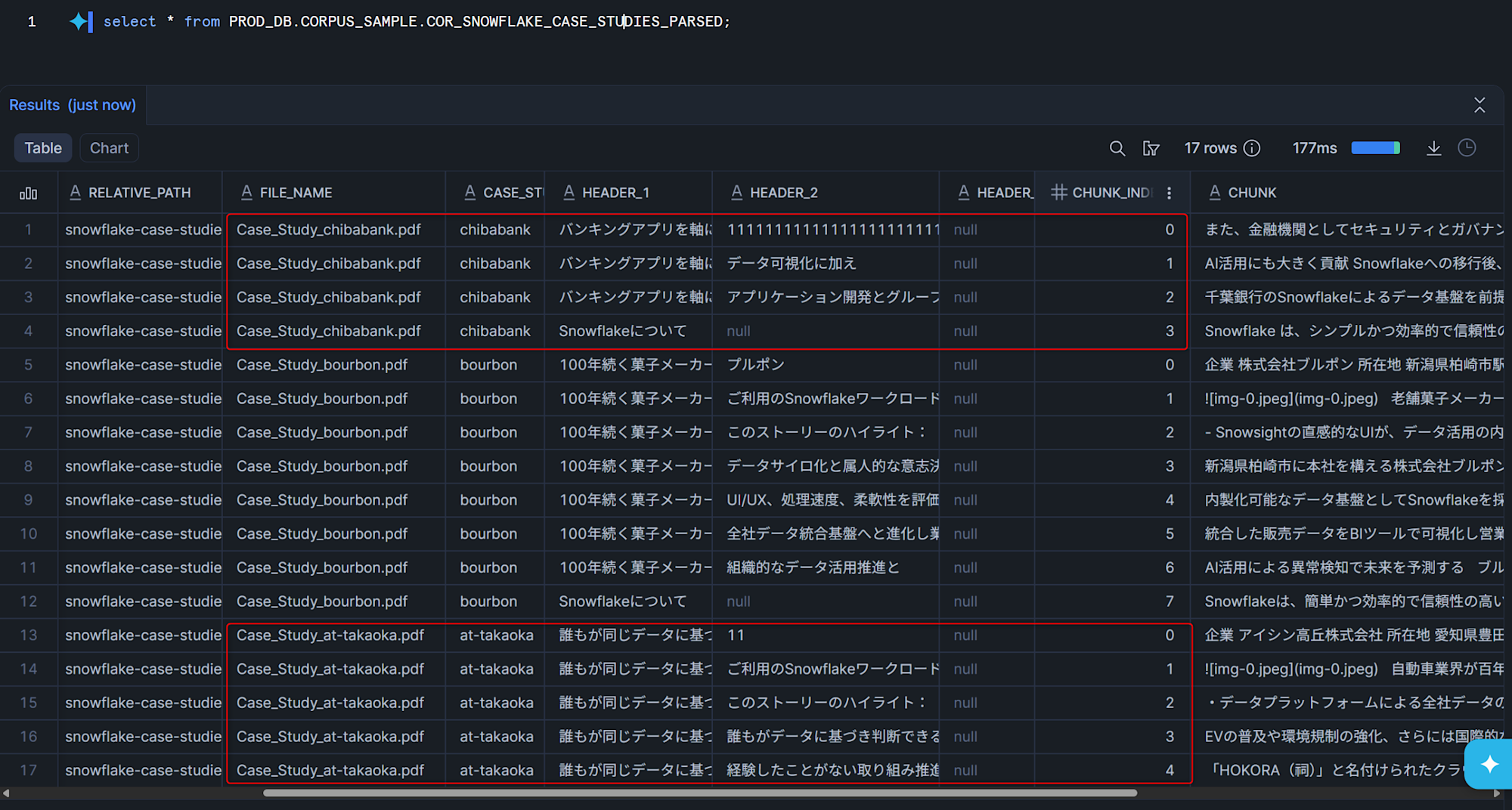
Running dbt build again produced the following:
- The chunk count for Aisan Takaoka decreased (page removed).
- New records for Chiba Bank were added.
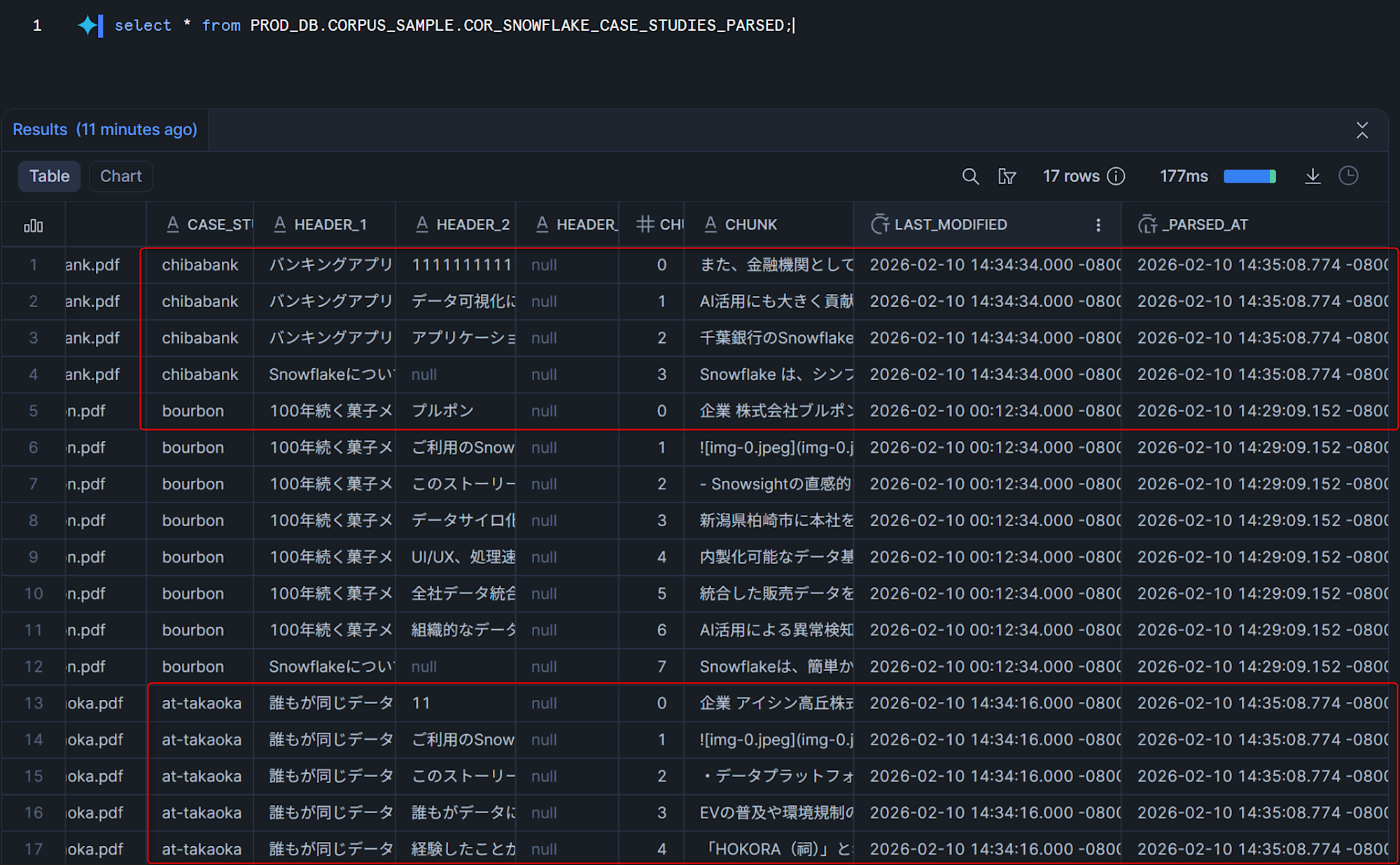
The _PARSED_AT column shows that only the records for the modified files (Aisan Takaoka and Chiba Bank) received updated timestamps.
Refreshing the Cortex Search Service
With the table updated, the search service was refreshed:
ALTER CORTEX SEARCH SERVICE PROD_DB.AIML_SAMPLE.CSS_SNOWFLAKE_CASE_STUDIES REFRESH;Querying through Snowflake Intelligence again confirmed that the updated data was being used for responses.
Conclusion
I explored building a dbt incremental model that parses PDFs, chunks them, and loads the chunks into a Cortex Search Service. By leveraging dbt’s incremental capabilities, only files that changed are re‑processed by the AI_PARSE_DOCUMENT function, which helps reduce compute costs.
I hope you find this useful!