
Building a Chrome Extension: From Idea to Automated Release
Source: Dev.to
Introduction
Chrome extensions are one of the fastest ways to ship useful software.
They’re lightweight, powerful, and force you to think in clear boundaries.
This article walks through how to build a Chrome extension using modern tooling, and how to automate versioning and releases using GitHub Actions.
What We’re Building
We’ll build a simple Chrome extension with:
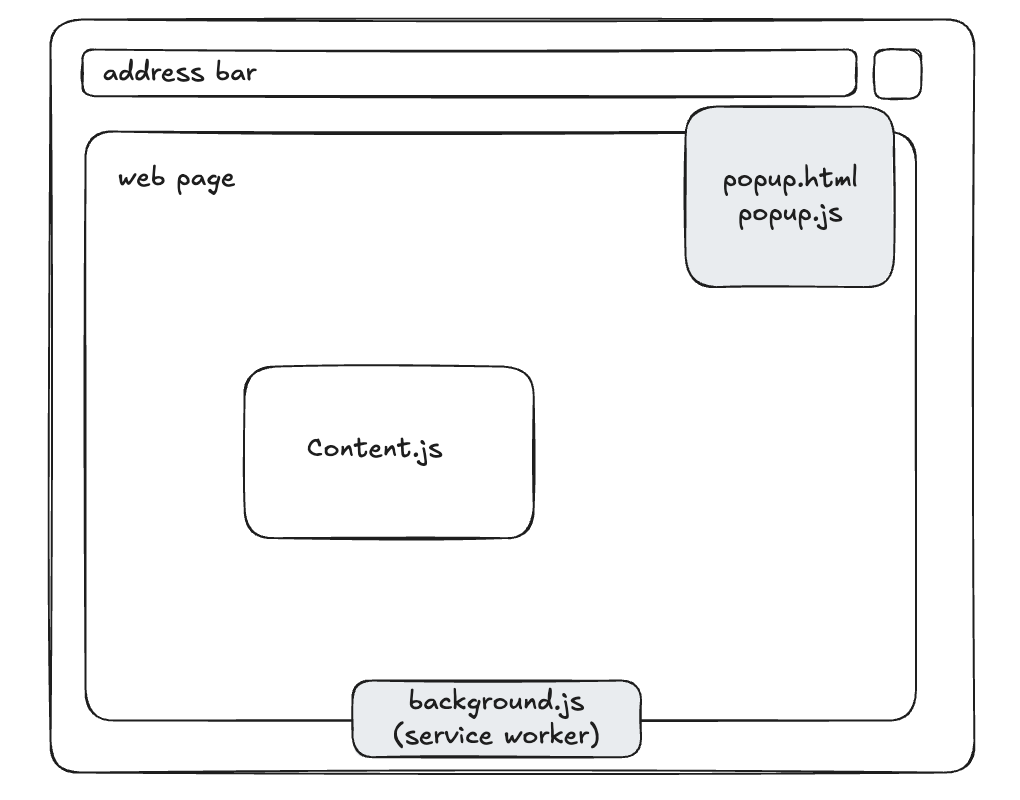
- A content script that interacts with web pages
- A background script that handles logic and coordination
- A popup UI for user interaction
- Automated build, versioning, and GitHub releases
Key Components
Manifest
Defines metadata, permissions, and entry points.
Content Script
Runs in the context of a web page.
Can read and manipulate the DOM.
Background Script
Runs independently of pages.
Handles state, messaging, and lifecycle events.
Popup UI
A short-lived interface shown when the extension icon is clicked.
Messaging Model
Chrome extensions are event‑driven. Components never directly access each other.
- Popup → sends user intent
- Background → coordinates logic
- Content Script → affects the page
Distribution Strategies
Chrome extensions are commonly distributed using one of the following approaches, depending on the stage of the project.
Chrome Web Store (Public & Auto‑Updating)
For public distribution, Chrome extensions can be published to the Chrome Web Store.
- Requires a one‑time $5 USD developer registration fee
- Enables automatic updates
- Makes the extension discoverable to non‑technical users
GitHub Releases (Free & Flexible)
Users install the extension by downloading the release archive and loading it manually in Chrome.
Using GitHub Actions, releases can be fully automated:
- Versioned ZIP artifacts
- Consistent builds
- No review or approval process
- No cost
Auto Scroll Extension
As a practical example, I built a Chrome auto‑scroller extension and set it up with a fully automated release pipeline using GitHub Actions. The project includes:
- A content script that controls page scrolling
- A popup UI for user interaction
- A background script for coordination
- Automated versioned releases on every Git tag
Source code
https://github.com/Prajwol-Shrestha/auto-scroll-browser-extenstion
Release Automation Overview
In this project, releases are automated as follows:
- A Git tag (e.g.
v1.0.1) is pushed - GitHub Actions builds the extension
- The build output is packaged into a ZIP
- A GitHub Release is created automatically
- The ZIP is attached as a release asset