
Building 10q10k.net: A Financial Visualization Platform Running Entirely on Cloudflare's Edge
Source: Dev.to
Here’s a cleaned‑up version of the markdown snippet, with the image link simplified and the source citation kept clear:
[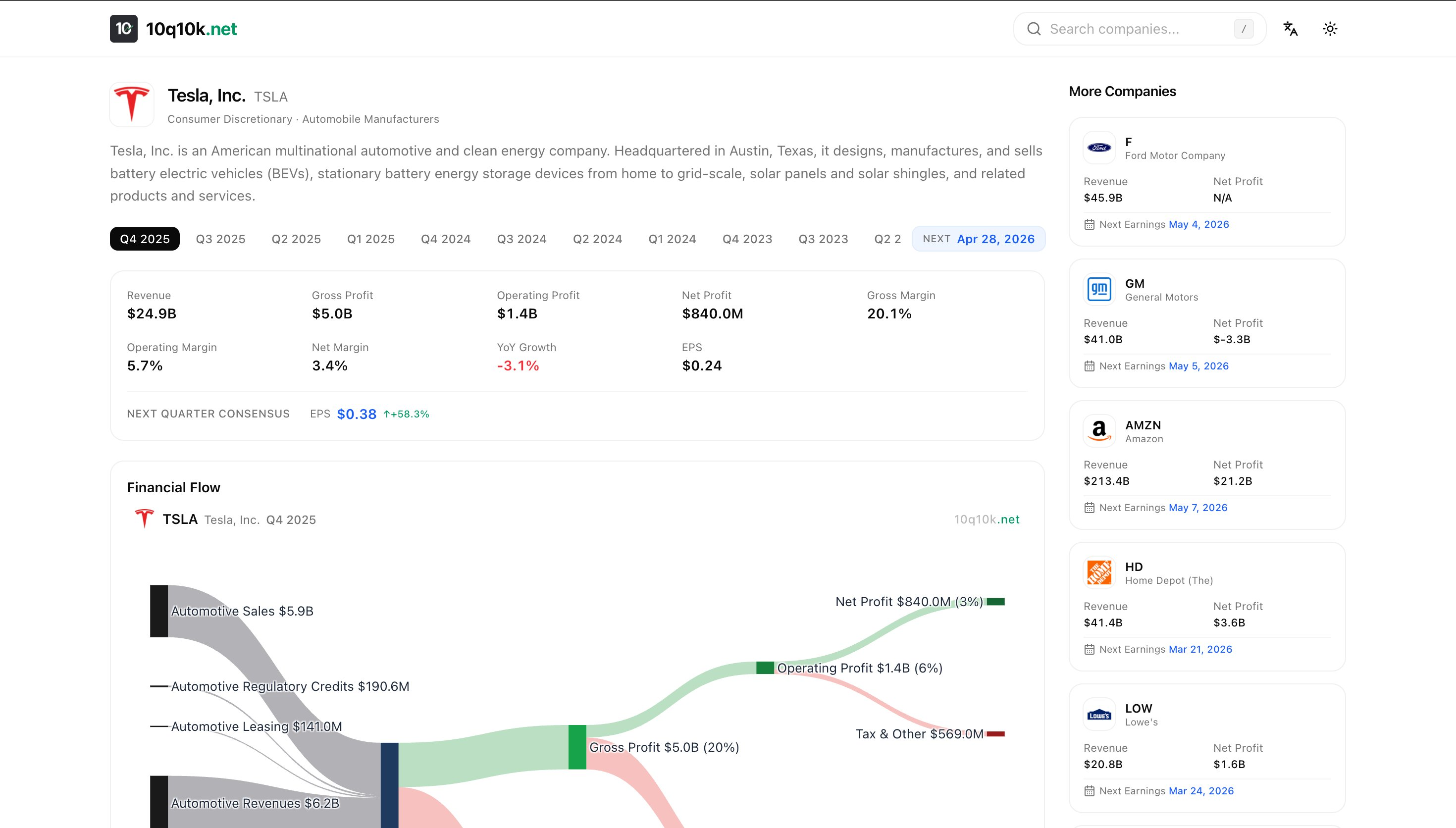](https://dev-to-uploads.s3.amazonaws.com/uploads/articles/wnkksn1qgsr5nm01sv5q.png)
---
**Source:** [Dev.to – Building 10Q10KNet: A Financial Visualization Platform Running Entirely on Cloudflare’s Edge](https://dev.to/kyles_light_275be0175609f/building-10q10knet-a-financial-visualization-platform-running-entirely-on-cloudflares-edge-2p31)TL;DR
10q10k.net is a financial‑data platform that covers all S&P 500 companies.
- Visualization: Interactive Sankey flow charts display how quarterly revenue moves through costs, profits, and expenses.
- Architecture: The entire stack runs on Cloudflare’s edge, requiring zero traditional servers.
What It Looks Like
Every company page shows:
- Sankey flow chart – maps revenue segments → gross profit → operating profit → net profit
- Financial metrics – YoY growth, margins, and EPS beat/miss indicators
- Statement breakdowns – Income Statement, Balance Sheet, and Cash Flow visualized with bar charts
- Earnings calendar – upcoming report dates
The charts are downloadable and copyable – hover to reveal action buttons.
Exported PNGs include company branding and a watermark, composited via the Canvas API.
Try it:
NVDA · AAPL · GOOG · MSFT
Architecture
pnpm monorepo
├── web/    # Next.js 16 (App Router) — frontend
├── worker/ # Cloudflare Worker — data pipeline
└── share/  # Shared TypeScript types & constants
Everything runs on Cloudflare
- Workers – server‑side compute
- D1 – edge SQLite for storage
- Pages – static assets
No EC2, no RDS, no Docker. Monthly cost is near‑zero on the free tier.
Technical Challenges
1. Financial Data Is Messier Than You Think
The same metric—Revenue—can be reported under many different names depending on the industry:
// Standard companies
"RevenueFromContractWithCustomerExcludingAssessedTax"
// Banks
"InterestAndNoninterestRevenue"
// Utilities
"ElectricUtilityRevenue"
// REITs
"RealEstateRevenueNet"
// Oil & Gas
"OilAndGasRevenue"
Some companies don’t report an explicit revenue figure at all. For those we fall back to a computed value:
OperatingIncome + CostsAndExpensesLesson: When working with financial data at scale, budget ~80 % of your time for edge cases and normalization.
2. The Fiscal Year Mapping Problem
Not every company’s fiscal year matches the calendar.
- Apple’s Q1 ends in December.
- Microsoft’s Q1 ends in September.
- Walmart’s fiscal year starts in February.
I built a quarter‑mapping system that normalizes all companies to calendar quarters, handling:
| Issue | How It’s Handled |
|---|---|
| Non‑standard fiscal year starts | Detect start month and shift quarters accordingly |
| 52‑week fiscal years (e.g., period ending Dec 28 vs Jan 1) | Map the extra week to the appropriate quarter |
| 7‑day grace period at quarter boundaries | Allow a ±7‑day window when matching dates |
3. Quarterly Cash Flow from Cumulative Data
Most companies report year‑to‑date (YTD) cumulative cash flows, not quarterly values. A Q3 filing shows nine months of data, not just Q3.
To derive a single quarter:
Q1 = Q1 YTD (as reported)
Q2 = H1 YTD − Q1 YTD
Q3 = 9M YTD − H1 YTD
Q4 = Annual − 9M YTD
The challenge is identifying the correct prior period to subtract. The algorithm:
- Matches entries by fiscal‑year start date.
- Selects the longest preceding period (critical for Q3, where you need the 6‑month entry, not the 3‑month one).
4. Revenue Segment Extraction
Breaking down revenue by business segment (e.g., Google Services vs. Google Cloud) requires parsing structured tags embedded in financial filings. The pipeline:
- Parse context elements – period dates, dimensional axes.
- Match financial values to their contexts.
- Score axes by revenue coverage – prefer axes where named segments cover ≥ 40 % of total revenue.
- Handle Q4 specially – derive from annual minus Q1 + Q2 + Q3.
5. The “Octopus” Sankey Layout
Standard Sankey charts become chaotic with 10+ nodes. I implemented a custom “octopus” layout:
- Center: Revenue node (the body).
- Left tentacles: Revenue segments, spread proportionally by value.
- Right flows: Cost of Revenue → Gross Profit → Operating Expenses → Net Profit.
Key layout decisions
| Decision | Reason |
|---|---|
| Value‑weighted Y positioning | Larger segments get proportionally more vertical space. |
| Flow conservation | Outflows never exceed inflows. |
| Loss handling | Companies with negative profits render red flows correctly. |
| Coverage threshold | Only show segments if they cover ≥ 40 % of revenue. |
Implemented with Plotly.js using arrangement: "fixed" and manually computed node coordinates. The default "snap" mode creates visual chaos at this scale.
6. Chart Export Without html2canvas
I initially used html2canvas for PNG export, but it crashed with:
Error: Attempting to parse an unsupported color function "lab"Modern CSS uses lab(), oklch(), etc., which html2canvas can’t handle.
The fix
Use Plotly’s native toImage() to export the chart, then composite branding via the Canvas API:
// 1. Export chart as PNG from Plotly
const dataUrl = await Plotly.toImage(chartEl, {
  format: "png",
  scale: 2
});

// 2. Create a larger canvas with header/footer space
const canvas = document.createElement("canvas");
const ctx = canvas.getContext("2d");

// 3. Draw background → header (logo, symbol, quarter) → chart → watermark
const chartImg = new Image();
chartImg.src = dataUrl;
chartImg.onload = () => {
  ctx.drawImage(chartImg, 0, headerHeight);
  // add logo, text, watermark here …
  canvas.toBlob(resolve, "image/png");
};
Result: Full control over the exported image—branding, background, and watermark—without relying on
html2canvas.
Frontend Stack
Next.js 16 on Cloudflare Workers
- Server components fetch from D1 at the edge – no API round‑trips, minimal latency worldwide.
- Deployed via
@opennextjs/cloudflare– the OpenNext adapter that makes the Next.js App Router work natively on Cloudflare.
Three‑Language i18n
Full English, Chinese, and Japanese support via next-intl.
- English URLs omit the locale prefix (
/AAPL). - Chinese and Japanese URLs are prefixed (
/zh/AAPL,/ja/AAPL).
SEO‑First Design
Every company page generates:
- Dynamic
<title>and<meta name="description">targeting analyst search queries. - JSON‑LD structured data (Corporation + Dataset schemas).
- Open Graph and Twitter Card meta tags.
- A comprehensive sitemap covering all companies × locales.
- Canonical URLs with
hreflangalternates.
Mobile Optimizations
- Bar charts –
staticPlot: trueon mobile to prevent accidental zoom while scrolling. - Sankey charts – horizontal‑scroll wrapper for small screens.
- Responsive layouts – two‑column grid on desktop, stacked on mobile.
What I Learned
Financial data normalization is the real challenge.
Fetching data is easy; making it consistent across 500 + companies with different reporting standards is where you spend all your time.Cloudflare’s edge stack is production‑ready.
D1 + Workers + Pages can power a real data platform. Zero DevOps, near‑zero cost.Plotly.js Sankey charts need manual layout.
The automatic positioning creates chaos with many nodes. Fixed coordinates with value‑weighted positioning is the way to go.Don’t use
html2canvasin 2026.
Modern CSS color functions (lab,oklch) break it. Use native chart‑library export + Canvas API compositing instead.YTD cumulative reporting is an underappreciated complexity.
If you’re building anything with quarterly financial data, you will need subtraction logic for cash flows.
Try It
10q10k.net – explore any S&P 500 company’s financial flow. The Sankey charts are interactive, downloadable, and available in three languages.
Built with: Next.js, Cloudflare Workers, D1, Plotly.js, and TypeScript.