
Breaking Up with WordPress After Two Decades
Source: Hacker News
Migration from SiteGround to Bluehost
Around Black Friday last November, I moved my website from SiteGround to Bluehost. This wasn’t an ambitious infrastructure decision—both providers offer shared hosting. SiteGround wanted roughly five times more at renewal, while Bluehost was materially cheaper and advertised 99.9 % uptime, which seemed good enough on paper. For a personal website, forty‑three minutes of downtime a month didn’t sound like a serious trade‑off. I don’t need elite infrastructure for a blog, but I also don’t want emails from updown.io telling me the site is down, or someone complaining that it broke halfway through reading.
The Migration Experience
The migration was painful. The dashboard tells the story well enough: the site was not catastrophically down, but it was noisy enough to keep eroding confidence. Response times varied more than I liked, and Bluehost still fell short of its advertised 99.9 % uptime. None of the support interactions—including the escalation path—felt technical enough to diagnose anything properly.
Bluehost did have Cloudflare integration, which at least made caching possible, but that layer was buggy enough that it never brought real peace of mind. Cheap infrastructure is only cheap while it stays boring; once it starts demanding attention, the savings are repaid in operational friction.
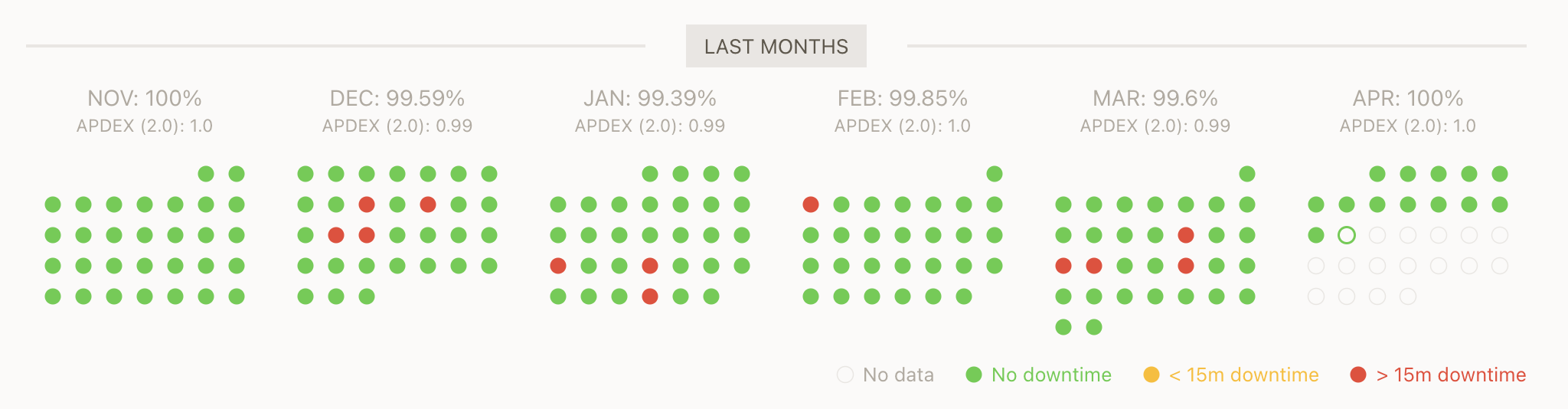
Uptime Dashboard for The Blog
The Hosting Move Was Only the Trigger {#the-hosting-move-was-only-the-trigger}
Nevertheless, the migration exposed a deeper mismatch. I had known for a while that WordPress was no longer quite what I wanted. I have been using WordPress since 2007, and it served me well. It gave me publishing, an admin panel, themes, plugins, comments, feeds, and a simple way to keep writing for years. I do not have some fashionable anti‑WordPress stance. It solved the right problem for a long time.
But my website today is mostly an archive, not a newspaper or a collaborative publication. It is years of writing across topics, languages, moods, eras, and levels of maturity.
WordPress is good at storing posts. It is less good—at least for how I want to work—at treating the archive as something I can inspect, reorganize, search locally, and reshape with intention.
What I Actually Wanted
The move off WordPress was not only about Bluehost. It was also about being able to work with my own writing in ways that had become awkward over time. I was drafting in Google Docs, then copying everything back into WordPress.
I wanted the site to behave less like a publishing interface and more like a body of work I could actually inspect. A long‑running blog compounds (see the compounding effect), like anything else, but compounding only helps if you can see and use what is there.
I also wanted to link posts more deliberately. Over time, a site like this develops invisible connections:
- A post from ten years ago may contain the seed of an idea I only developed properly last year.
- Another may deserve a sequel, a correction, or a narrower follow‑up.
In WordPress, those links often stayed accidental.
The migration also forced me to treat the site as data as well as prose. I had to:
- Classify things more clearly.
- Define categories with more intention.
- Use tags more deliberately.
- Introduce a series model for posts that belong together.
What We Have So Far
That is what pushed me toward Yapress – it stands for, drum roll please, my initials plus “press.” That is why I am not in advertising. I used a combination of Codex, Claude, and Gemini to build it and added it to my new launches list.
The project has gradually turned into a markdown‑first publishing setup. It supports:
- WordPress import
- Taxonomies, series, and archives
- Content validation
I had never published anything to npm before, so this little project gave me that milestone too.
Note: The feature list isn’t the point. The point is that the site now lives in files. I can:
- Search everything locally
- Edit it in a code editor
- Version it with Git
- Reorganize it without wrestling with WordPress each time
I even added a plugin system. Because the site is completely static, plugins are limited to injecting code fragments rather than doing anything dynamic at runtime – which is fine for my needs.
It also gave me a cleaner way to preserve older URLs during the migration, which mattered because I didn’t want to break years of links.
The Trade‑Off {#the-trade-off}
This was not a free move. I spent a good amount of time vibe‑coding Yapress, stepping in whenever it started to choke, triple‑checking links, and building a set of scripts to make sure everything worked the way it should.
Why WordPress Still Looks Good
- Mature admin interface
- Quick browser edits
- Large ecosystem
- Familiar conventions
What I Gave Up
Going static or markdown‑first means losing some of WordPress’s conveniences, especially around comments and subscriptions. I dropped comments for now, but I built a small plugin – yapress‑mailerlite – to handle subscriptions.
The Trade‑Off in Practice
- More direct ownership – I control the whole stack.
- Simpler system – I prefer running something I understand rather than outsourcing understanding to a larger, opaque platform.
My Platform‑Engineering Standard
A platform earns its keep only when it gives users a paved road that is genuinely better than rolling their own:
- Lower friction
- Lower cognitive load – see my post on stop‑wasting‑brainpower
- Better defaults
- Safer operation
If users can build a path that is just as good—or better—the platform isn’t helping.
Why I’m Rewriting This Site
WordPress still carries the constraints of a platform but offers less of the upside. I’m not rewriting the site because I suddenly care about hyperscale blog infrastructure; I’m doing it because the archive has become the primary asset, and I need a setup that matches that reality.
In Consequence
I know this can look like over‑engineering, but the incentives are good. I chose Next.js for now because it is easy to deploy and I already know the tooling. I could move to Cloudflare’s free tier later, but at this stage I value familiarity more than squeezing out every possible optimisation.
I also suspect this matters more now than it did five years ago. AI assistance changed the question from “Is this worth building?” to “Is this the right thing to build?”. WordPress was always friction. What changed was the cost of replacing it. Once that drops low enough, the question then becomes not whether you can afford to change it, but whether you can justify not doing it.