
Beyond input(): Building Production-Ready Human-in-the-Loop AI Agents with LangGraph
Source: Dev.to
Introduction
If you’ve built a simple chatbot or CLI tool, you’ve probably reached for Python’s trusty input() function. It works great for quick scripts: ask a question, wait for an answer, done. But what happens when you need to build something more sophisticated? What if your AI agent needs to pause mid‑workflow, wait for human approval (maybe for hours or days), and then pick up exactly where it left off?
That’s where input() falls flat on its face.
The Problem with input()
Let’s be honest: input() is a synchronous blocker. It freezes your entire program, waiting for someone to type something and hit Enter. Here’s what that actually means in production:

Imagine you’re building an AI approval system for financial transactions. A manager gets a notification at 4 PM on Friday about a $50,000 transaction that needs review. They’re heading out for the weekend. With input(), your process would just… sit there, blocking.
With LangGraph, the workflow pauses, releases all resources, and waits patiently. When the manager approves it Monday morning, it picks up seamlessly.
Wait, Haven’t We Seen This Before? The BizTalk Connection
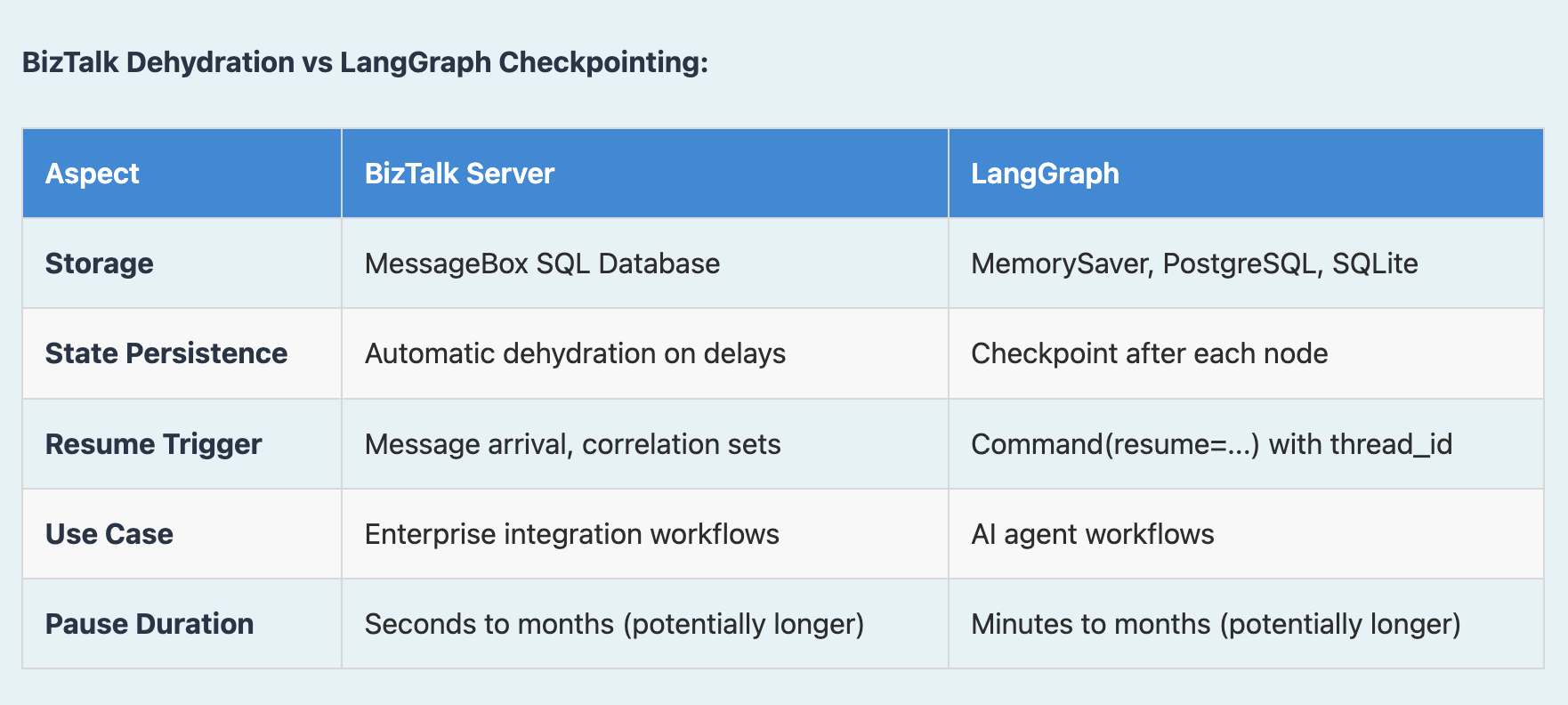
If you’ve worked with Microsoft BizTalk Server, this might feel familiar. LangGraph’s checkpointing system is conceptually similar to BizTalk’s dehydration/rehydration mechanism—and for good reason. Both solve the same fundamental problem: how do you pause a long‑running workflow without wasting resources?
BizTalk’s Approach: Dehydration and Rehydration
In BizTalk Server, when an orchestration (workflow) needs to wait for a message, a timeout, or human approval, BizTalk doesn’t keep it running in memory. Instead, it:
- Dehydrates the orchestration instance by serializing its complete state to the MessageBox database.
- Removes it from memory, freeing up server resources.
- When the trigger arrives (message received, timeout reached), BizTalk rehydrates the instance by loading the state from the database.
- Continues execution exactly where it left off.
BizTalk Dehydration vs. LangGraph Checkpointing
What I Learned from BizTalk
Having worked with BizTalk Server, I can tell you the dehydration/rehydration pattern is essential for enterprise workflows. Here’s why it matters:
- Purchase Order Approval – An order comes in, gets validated, then waits for manager approval. In BizTalk, that orchestration dehydrates to the database. The manager might approve hours, days, or weeks later; when they do, the orchestration rehydrates and continues processing.
- Long‑Running Transactions – Multi‑step business processes that span days, weeks, or even months (e.g., insurance claims, contract approvals, regulatory workflows) can’t stay in memory. BizTalk stores the state in SQL Server, tracking correlation sets to match incoming messages to the right orchestration instance. I’ve seen orchestrations dehydrated for weeks waiting for external approvals or third‑party responses.
- Server Restarts – If BizTalk Server crashes or restarts, all dehydrated orchestrations survive because they’re persisted in the database. They automatically resume when the server comes back up.
LangGraph brings this same battle‑tested pattern to AI workflows. Instead of XML messages and correlation sets, you have AI agent states and thread IDs. Instead of the MessageBox database, you use PostgreSQL or SQLite. But the core concept—persist the state, free the resources, resume later—is identical.
Fun Fact: BizTalk’s MessageBox database is essentially a massive state machine. Every orchestration instance’s state is stored with its correlation properties, allowing BizTalk to route incoming messages to the correct waiting orchestration. LangGraph’s checkpointer does the same thing for AI agent workflows—the thread_id is your correlation set!
The Three Pillars of Human‑in‑the‑Loop
Building production‑grade human‑in‑the‑loop systems requires three key pieces working together. Let’s break them down.
1. Checkpointing: Your Agent’s Memory
Before an agent can pause and resume, it needs memory. Not just any memory—persistent, reliable memory that survives crashes, restarts, and even moves to a different server.
from langgraph.checkpoint.memory import MemorySaver
from langgraph.graph import StateGraph

# In‑memory checkpointer (great for development)
checkpointer = MemorySaver()

# For production, use PostgresSaver or SQLiteSaver
graph = workflow.compile(checkpointer=checkpointer)
Key insight: Without a checkpointer, interrupts won’t work. Period. The checkpointer stores the complete execution state—variables, context, progress—so when you come back hours or days later, nothing is lost.
Think of it like saving a video game. When you checkpoint, you’re not just saving one variable; you’re saving your exact position, inventory, health, quest progress—everything. When you resume, you’re right back where you were.
2. In
(The original content cuts off here. Continue with the remaining sections as needed.)
Interrupts: The Pause Button
Now that we have memory, we need the ability to actually pause. LangGraph gives you two ways to do this:
Static Interrupts – “Always Pause Here”
Use these when you know certain nodes always require human review.
# Pause BEFORE a node executes
graph = workflow.compile(
    checkpointer=checkpointer,
    interrupt_before=["sensitive_action"]
)

# Pause AFTER a node executes (useful for review)
graph = workflow.compile(
    checkpointer=checkpointer,
    interrupt_after=["generate_response"]
)
Static interrupts are great for compliance scenarios.
Every content generation might need human approval before publishing, or every database deletion might need a second pair of eyes.
Dynamic Interrupts – Conditional Pausing
Use these when whether to pause depends on what’s happening at runtime.
from langgraph.types import interrupt

def process_transaction(state):
    amount = state["transaction_amount"]

    # Only pause for high‑value transactions
    if amount > 10_000:
        human_decision = interrupt({
            "question": f"Approve transaction of ${amount}?",
            "transaction_details": state["details"]
        })

        if human_decision.get("approved") != True:
            return {
                "status": "rejected",
                "reason": human_decision.get("reason")
            }

    # Continue with transaction
    return {"status": "approved", "processed": True}
This is powerful. Your AI can make smart decisions about when it needs help:
- Low confidence score → pause and ask.
- Transaction > $10 K → pause and ask.
- Everything else → keep moving.
When to Use Which?
| Type | Typical Use‑Case |
|---|---|
| Static | Compliance reviews, final approvals, any “always pause here” scenario |
| Dynamic | High‑value transactions, low‑confidence predictions, edge cases |
Commands: The Resume Button
So you’ve paused your workflow, a human has reviewed it, and made a decision. Now what? This is where Command comes in:
from langgraph.types import Command

# Resume the paused workflow with the human's input
result = graph.invoke(
    Command(resume={
        "approved": True,
        "notes": "Verified customer identity"
    }),
    config={"configurable": {"thread_id": "transaction-123"}}
)
What Happens Under the Hood
BEFORE (workflow paused at interrupt):
    human_input = interrupt({...})   # ← Waiting here, state saved

RESUME (human provides decision):
    graph.invoke(Command(resume={"approved": True}), config)
                ↓
    Data flows back to interrupt()
                ↓
AFTER:
    human_input = {"approved": True} # ← Now has the human's response!
The workflow continues from exactly this point. The graph does not restart or replay everything; it picks up where it left off, with the human input available right there in the node.
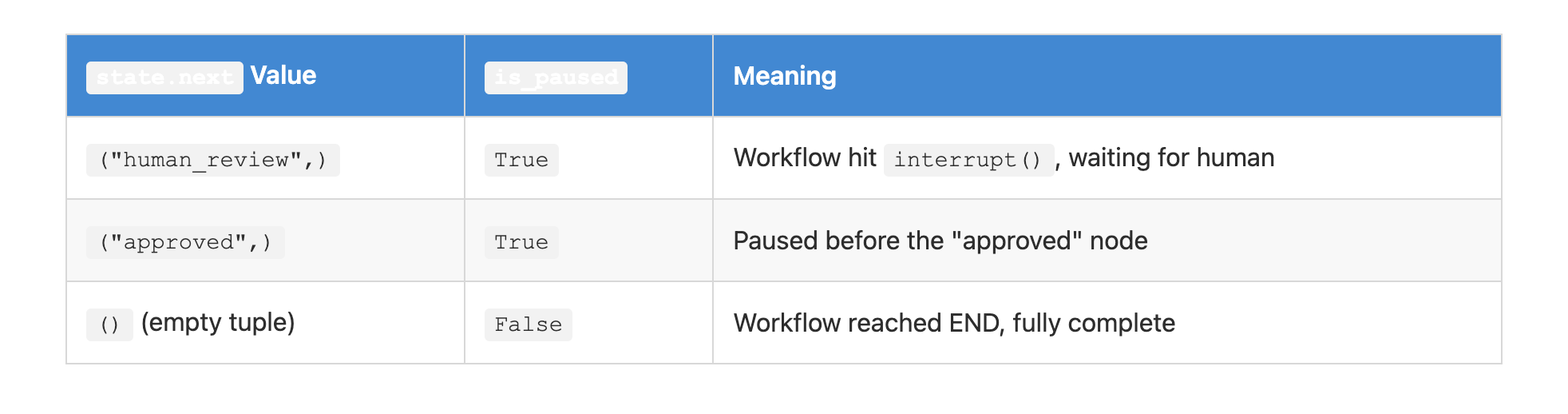
Visual Overview

Putting It All Together
Here’s what a real‑world production workflow looks like:
from langgraph.checkpoint.memory import MemorySaver
from langgraph.types import interrupt, Command
from langgraph.graph import StateGraph

# 1. Set up checkpointing
checkpointer = MemorySaver()

# 2. Define your workflow with dynamic interrupts
def review_node(state):
    if state["risk_score"] > 0.8:
        decision = interrupt({
            "message": "High‑risk detected. Review required.",
            "data": state["analysis"]
        })
        return {"approved": decision["approved"]}
    return {"approved": True}

# 3. Compile with persistence
graph = workflow.compile(checkpointer=checkpointer)

# 4. Invoke the workflow
config = {"configurable": {"thread_id": "workflow-123"}}
result = graph.invoke(initial_state, config)

# 5. Check if paused
state = graph.get_state(config)
if bool(state.next):
    print("Workflow paused, waiting for human input")

    # Later, when the human responds...
    graph.invoke(
        Command(resume={"approved": True}),
        config
    )
Why This Matters
In production AI systems you can’t afford to block indefinitely. You need workflows that:
- Pause for human judgment without consuming resources.
- Survive restarts and handle hundreds of concurrent executions.
- Allow a pause on Friday and a resume on Monday without losing any context.
That’s not what input() was designed for, but it’s exactly what LangGraph’s human‑in‑the‑loop system was built to handle. The difference isn’t just technical—it’s the difference between a toy and a tool you can actually deploy.
Final Thoughts
Building human‑in‑the‑loop AI isn’t just about adding a pause button to your workflows. It’s about creating systems that respect the asynchronous, unpredictable nature of human decision‑making. Your managers don’t work on your code’s schedule; they take weekends off and need time to think. With LangGraph’s static and dynamic interrupts plus the Command resume mechanism, you can give them that flexibility while keeping your AI pipelines robust, scalable, and production‑ready.
Conclusion
You might need to consult with others before making a decision.
LangGraph’s architecture—with its three pillars of checkpointing, interrupts, and commands—acknowledges this reality. It gives you the tools to build AI systems that work with humans, not despite them.
So the next time you reach for input(), ask yourself: Am I building a script, or am I building an AI (AI Agents) system? If it’s the latter, you know what to do.
Happy building!
Thanks,
Sreeni Ramadorai