
[AWS] 4. EC2 Instance Storage Section, EBS (Elastic Block Store), AMI (Amazon Machine Image), EFS (Elastic File System)
Published: (December 14, 2025 at 04:02 AM EST)
6 min read
Source: Dev.to
Source: Dev.to
EBS Volume
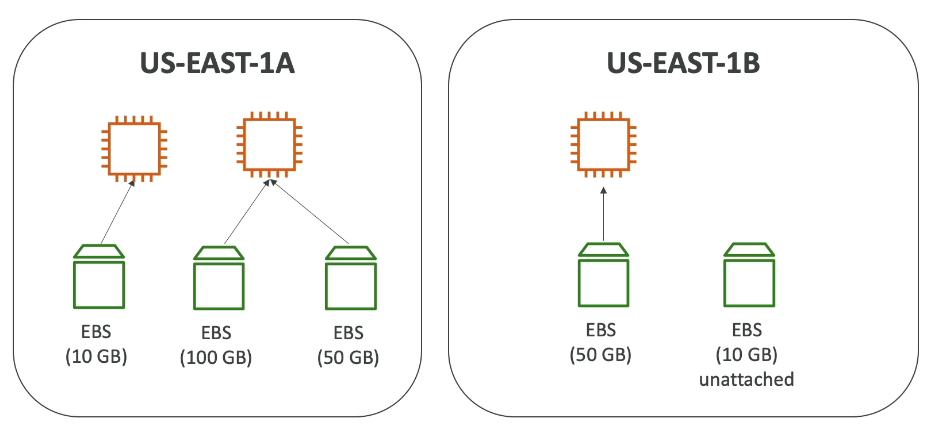
- An EBS (Elastic Block Store) volume is a network drive you can attach to your instances while they run.
- It allows your instances to persist data, even after their termination.
- It can be mounted to only one instance at a time (at the CCP level).
- It is bound to a specific Availability Zone (AZ).
- Analogy: think of it as a “network USB stick”.
Characteristics
- Uses the network to communicate with the instance, which can introduce a small amount of latency.
- Can be detached from one EC2 instance and quickly attached to another.
- Locked to an AZ: a volume in
us-east-1acannot be attached tous-east-1b. To move it across AZs, you must first create a snapshot.
Provisioned Capacity
- You provision size (GB) and IOPS.
- You are billed for all provisioned capacity.
- Capacity can be increased over time.
Korean (한국어)
- 네트워크 드라이브로 실행 중인 인스턴스에 연결 가능
- 인스턴스 종료 후에도 데이터 지속 가능
- 한 번에 하나의 인스턴스에만 마운트 가능 (CCP 수준)
- 특정 가용 영역에 종속
- 비유: “네트워크 USB 스틱”
- 네트워크를 사용하므로 약간의 지연 발생 가능
- EC2 인스턴스에서 분리 후 다른 인스턴스에 빠르게 연결 가능
- 가용 영역 제약:
us-east-1a의 볼륨은us-east-1b에 연결 불가 (스냅샷 필요) - 프로비저닝된 용량(GB 및 IOPS) 보유, 전체 용량에 대해 요금 청구, 시간 경과에 따라 용량 증가 가능
EBS Delete on Termination Attribute
- Controls what happens to EBS volumes when an EC2 instance terminates.
- Default behavior:
- Root EBS volume is deleted (attribute enabled).
- Any other attached EBS volume is not deleted (attribute disabled).
- This can be changed via the AWS Management Console or AWS CLI.
Use case: Preserve the root volume when the instance is terminated.
Korean (한국어)
- EC2 인스턴스 종료 시 EBS 동작 제어
- 기본값: 루트 EBS 볼륨은 삭제됨 (속성 활성화)
- 기본값: 다른 연결된 EBS 볼륨은 삭제되지 않음 (속성 비활성화)
- AWS 콘솔 또는 CLI로 제어 가능
- 사용 사례: 인스턴스 종료 시 루트 볼륨 보존

EBS Snapshots
- Create a point‑in‑time backup of an EBS volume.
- Detaching the volume before snapshotting is not required, but it is recommended.
- Snapshots can be copied across AZs or Regions.
Korean (한국어)
- 특정 시점의 EBS 볼륨 백업(스냅샷) 생성
- 스냅샷 생성 시 볼륨 분리가 필수는 아니지만 권장됨
- 스냅샷을 AZ 또는 리전 간에 복사 가능

EBS Snapshot Features
EBS Snapshot Archive
- Move a snapshot to an “archive tier” that is ~75 % cheaper.
- Restoring from the archive takes 24–72 hours.
Recycle Bin for EBS Snapshots
- Set retention rules (1 day to 1 year) to recover snapshots that were accidentally deleted.
Fast Snapshot Restore (FSR)
- Forces full initialization of a snapshot so the first I/O has no latency (incurs additional cost).
Korean (한국어)
- EBS Snapshot Archive: 75 % 저렴한 “아카이브 티어”로 이동, 복원에 24~72시간 소요
- Recycle Bin for EBS Snapshots: 삭제된 스냅샷 복구를 위한 보존 규칙 설정 (1일~1년)
- Fast Snapshot Restore (FSR): 첫 사용 시 지연 제거를 위해 스냅샷 완전 초기화 (비용 상승)

AMI Overview
- AMI = Amazon Machine Image.
- An AMI is a customization of an EC2 instance: you add software, configuration, OS, monitoring, etc.
- Using an AMI reduces boot and configuration time because everything is pre‑packaged.
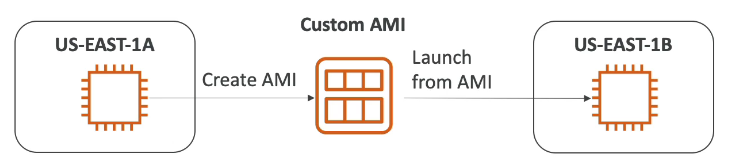
- AMIs are built for a specific Region but can be copied across Regions.
Sources for launching an EC2 instance:
- Public AMI – provided by AWS.
- Your own AMI – created and maintained by you.
- AWS Marketplace AMI – created by third parties (may be sold).
Korean (한국어)
- AMI는 EC2 인스턴스의 사용자 정의 이미지
- 자체 소프트웨어, 구성, 운영 체제, 모니터링 등 추가
- 사전 패키징으로 부팅/구성 시간 단축
- 특정 리전용으로 빌드되며 리전 간 복사 가능
EC2 인스턴스 시작 출처:
- 퍼블릭 AMI (AWS 제공)
- 자체 AMI (직접 생성 및 유지)
- 마켓플레이스 AMI (타사 제공, 판매 가능)
AMI Process (from an EC2 Instance)
- Start an EC2 instance and customize it.
- Stop the instance (ensures data integrity).
- Create an AMI – this also creates the associated EBS snapshots.
- Launch new instances from the created AMI.
Korean (한국어)
- EC2 인스턴스를 시작하고 사용자 정의
- 데이터 무결성을 위해 인스턴스 중지
- AMI 빌드 – EBS 스냅샷도 함께 생성됨
- 다른 AMI에서 인스턴스 시작
EC2 Instance Store
- EBS volumes are network drives with good but limited performance.
- For high‑performance hardware disks, use EC2 Instance Store.
- Provides better I/O performance.
- The storage is ephemeral: it is lost when the instance stops.
- Ideal for buffer, cache, scratch data, or temporary content.
- Data loss risk if hardware fails; backups and replication are the user’s responsibility.
Korean (한국어)
- EBS 볼륨은 네트워크 드라이브로 성능이 좋지만 “제한적”
- 고성능 하드웨어 디스크가 필요하면 EC2 Instance Store 사용
- 더 나은 I/O 성능 제공
- 인스턴스 중지 시 스토리지 손실 (임시 저장소)
- 버퍼/캐시/스크래치 데이터/임시 콘텐츠에 적합
- 하드웨어 장애 시 데이터 손실 위험, 백업 및 복제는 사용자 책임
Local EC2 Instance Store
