
Automatically Post Incoming Emails with attachments to Facebook Using n8n
Source: Dev.to
What This Automation Does
- Watches an email inbox
- Uses the email subject as the Facebook caption
- Converts and uploads image attachments
- Publishes the post automatically
Workflow Overview
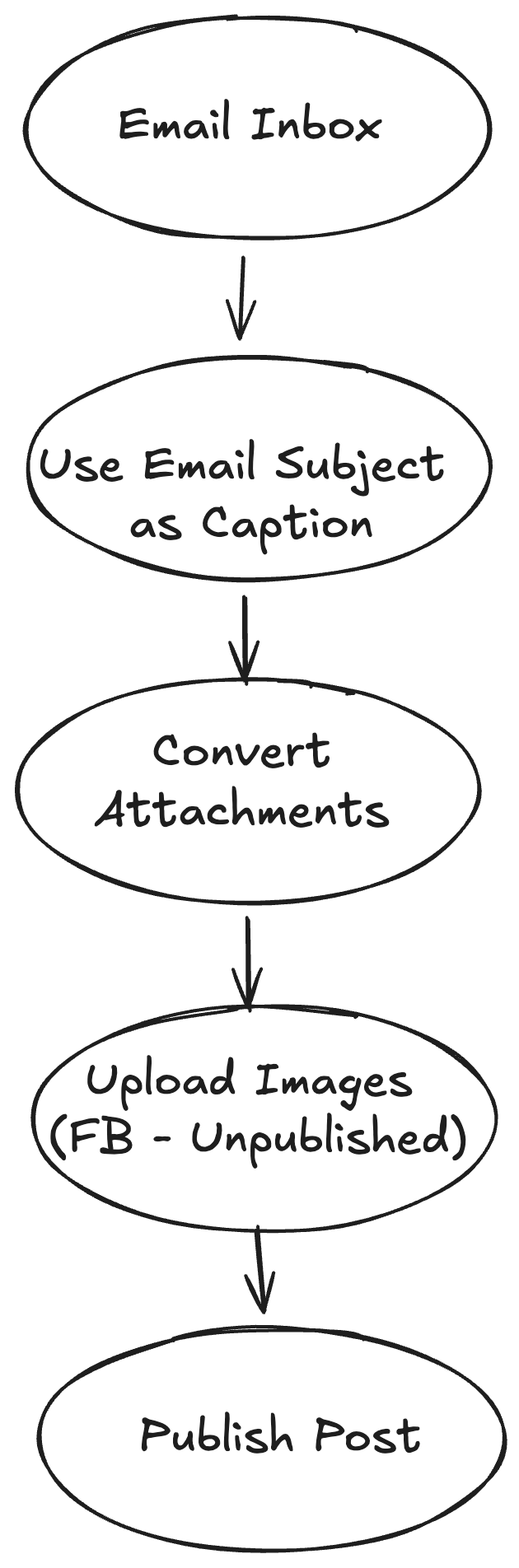
High-level view of the email → Facebook automation workflow
Why IMAP (and Not the Gmail Trigger)
I initially tried using n8n’s Gmail Trigger because it felt more “native”. In practice, it wasn’t reliable enough for my use case:
- New emails didn’t always trigger the workflow
- Occasionally, nothing fired at all
For an automation that posts publicly, missing even one email isn’t acceptable. I switched to IMAP for a few practical reasons:
- Consistent execution – new emails were picked up every time
- Works with any email provider – not locked into Gmail’s API
It’s simple, reliable, and kept the workflow firing every time — exactly what I needed.
Handling Facebook Image Posts
Facebook doesn’t let you upload multiple images directly in a single post. Instead, you have to:
- Upload each image as unpublished
- Collect the returned
media_fbids - Attach those IDs when creating the final post
Step 1: Loop through attachments
Use a Loop Over Items node to process each attachment individually.
Step 2: Upload as unpublished
POST https://graph.facebook.com/{page-id}/photos- Set
published: false - Pass the attachment URL
Each upload returns a media_fbid – save these.
Step 3: Create the final post
POST https://graph.facebook.com/{page-id}/feed- Use the email subject as the
message - Attach all the collected
media_fbids
Once this flow is understood, the rest is straightforward.
Gotchas I Ran Into
Attachment format matters
n8n treats email attachments as binary data. I had to use the Convert to File node before uploading to Facebook; otherwise the API rejected them.
Facebook permissions
Make sure your app has pages_manage_posts and pages_read_engagement permissions, or uploads will fail.
Final Thoughts
This isn’t a flashy automation — but it quietly saves time and removes friction. If you’re already using n8n and dealing with repetitive posting, this kind of workflow is absolutely worth building. Sometimes the best automations are the ones you don’t even notice anymore.