
Amazon RDS Demystified: Why Amazon RDS is Still a Game-Changer?
Source: Dev.to
If you’ve ever installed a database on a VM, configured backups at 2 AM, worried about failover, or tuned Linux memory for MySQL—you already know the pain.
Now imagine never doing that again.
That’s exactly what Amazon RDS gives you: a fully managed relational database where you focus on data and queries while AWS handles the heavy lifting.
What Problem Does RDS Actually Solve?
Running databases yourself means handling:
- OS installation & patching
- Database installation & upgrades
- Backup strategies
- Replication setup
- Failover planning
- Monitoring and alerting
- Security hardening
RDS automates all of this with built‑in best practices.
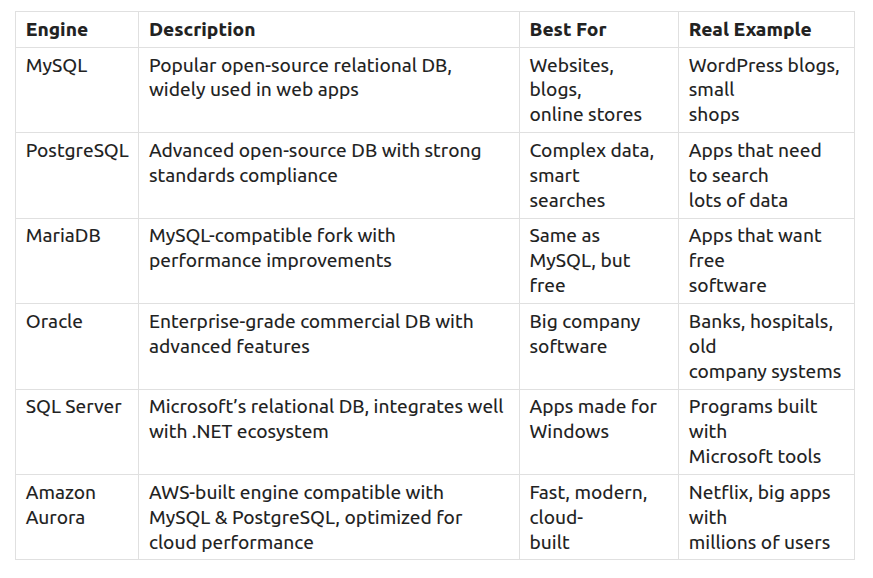
The 6 Database Engines Supported by RDS (Must Remember)
Multi-AZ vs Read Replicas – Sync vs Async Replication
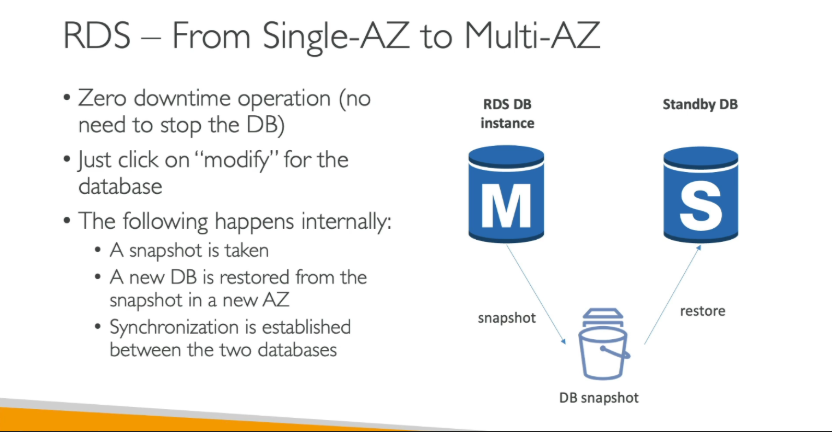
Multi-AZ (Synchronous Replication)
- Primary DB writes data.
- Standby DB in another AZ confirms the write.
- Only then is the transaction complete.
Purpose: High availability and zero data loss.
Trade‑off: Slightly higher write latency.
How to Make DB Available in Multi‑AZ
Read Replicas (Asynchronous Replication)
- Primary DB completes write immediately.
- Data is sent to replicas afterward.
- Replicas may lag (replication lag).
Purpose: Scale read traffic, reporting, analytics.
Trade‑off: Eventual consistency, possible data loss if primary crashes before sync.
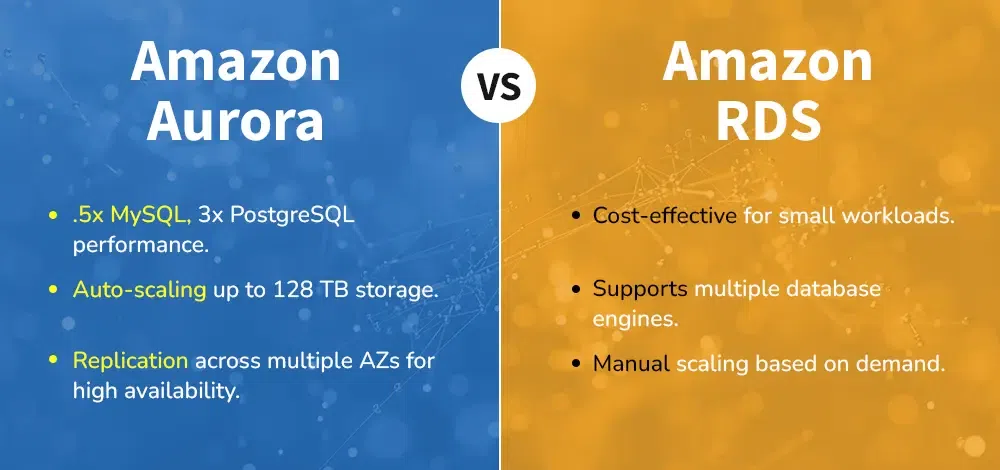
RDS vs Aurora – Quick Decision Guide
- Choose standard RDS when you need maximum engine flexibility or specific commercial database features (Oracle, SQL Server).
- Choose Aurora when performance, scalability, and cost‑efficiency matter most. Aurora offers higher throughput, automatic storage scaling in 10 GB increments, and faster failover.
What Is RDS Custom?
For Oracle and SQL Server only, RDS Custom allows OS‑level access and SSH to the underlying instance—useful for legacy or special compliance needs.